svchost.exe is one of those processes that always showed up when there was
trouble. If you have spent enough time looking at Windows telemetry, you have
probably stared at it more than you wanted to.
A couple of years back I looked at svchost.exe and explained its command-line
options in Demystifying The SVCHOST.EXE Process And Its Command Line
Options.
The tl;dr from that post is that a normal service-hosted process is very recognizable. svchost.exe is usually a child of services.exe, and it normally has flags telling us and the SCM, which service group or service it is hosting.
Something like:
svchost.exe -k netsvcs -p -s ScheduleBut if you have been around long enough around telemetry, I am pretty sure you have
seen something like this: MsMpEng.exe spawning an svchost.exe instance without those usual service-host flags.
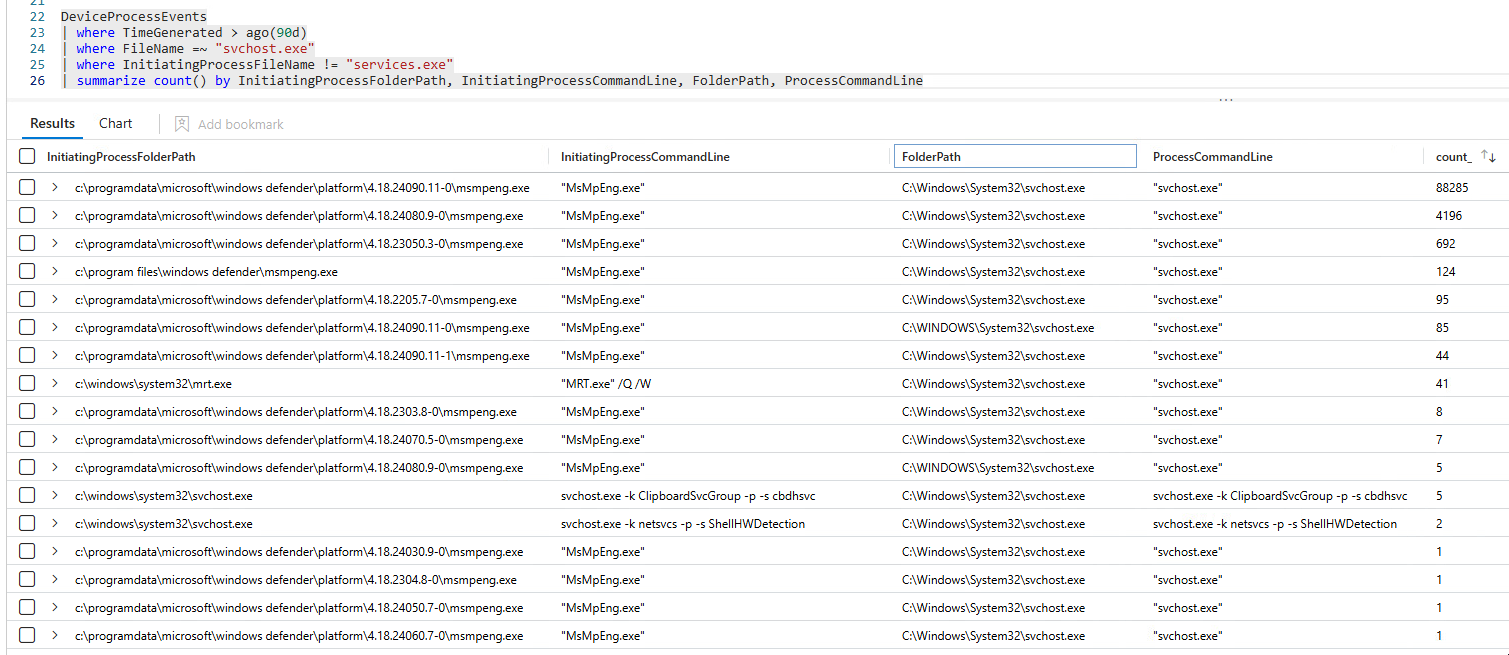
Today we are going to demystify that once and for all.
This writeup only cares about the goal of explaining the specific Defender behavior of
MsMpEng.exespawningsvchost.exe. So, I will skip over a lot of details and simplify the flow to keep this focused and as a nice coherent story.
Layer I - Starting From MsMpEng.exe#
Obviously, we start from MsMpEng.exe, because that is the process showing up
as the parent in the process tree.
My first theory was to look for CreateProcess like APIs, if none was found, we assume it's a behavior of a loaded DLL.
After investigation, however, we find that MsMpEng.exe is "mostly" a loader and bootstrapper.
The overview that matters to us of the flow looks something like this:
main
  -> HrExeMain
    -> MpCheckPlatformUpdate(&hModule)
      -> LoadMpSvcFrom(..., "%ls\\mpsvc.dll", ...)
      -> ValidateMpSvc(hModule) // hModule is the loaded mpsvc.dll
         -> GetProcAddress(hModule, "ValidateDrop")
    -> GetProcAddress(hModule, "ServiceCrtMain") // We call the exported ServiceCrtMain from mpsvc.dll
    -> ServiceCrtMain(0, 0)
LoadMpSvcFrom builds a path to mpsvc.dll, opens it, loads it with
LoadLibraryExW, and then later on HrExeMain get the address of ServiceCrtMain from the same DLL and jumps into it.
From this, we jump into mpsvc.dll.
Layer II - MpSvc.dll#
This layer of MpSvc.dll is a bit more complicated, and I will not bore with you unnecessary details to this writeup. But I followed a similar approach as before, looking for CreateProcess like APIs, loaded libraries and strings as an initial heuristic.
We do find some CreateProcess like APIs but I will skip those for another writeup.
What you need to know is that the answer is not in mpsvc.dll, but it is in the other next layer, which is mpengine.dll the Defender engine module.
Layer III - We're finally at MpEngine.dll#
Using a similar approach, we find the culprit.
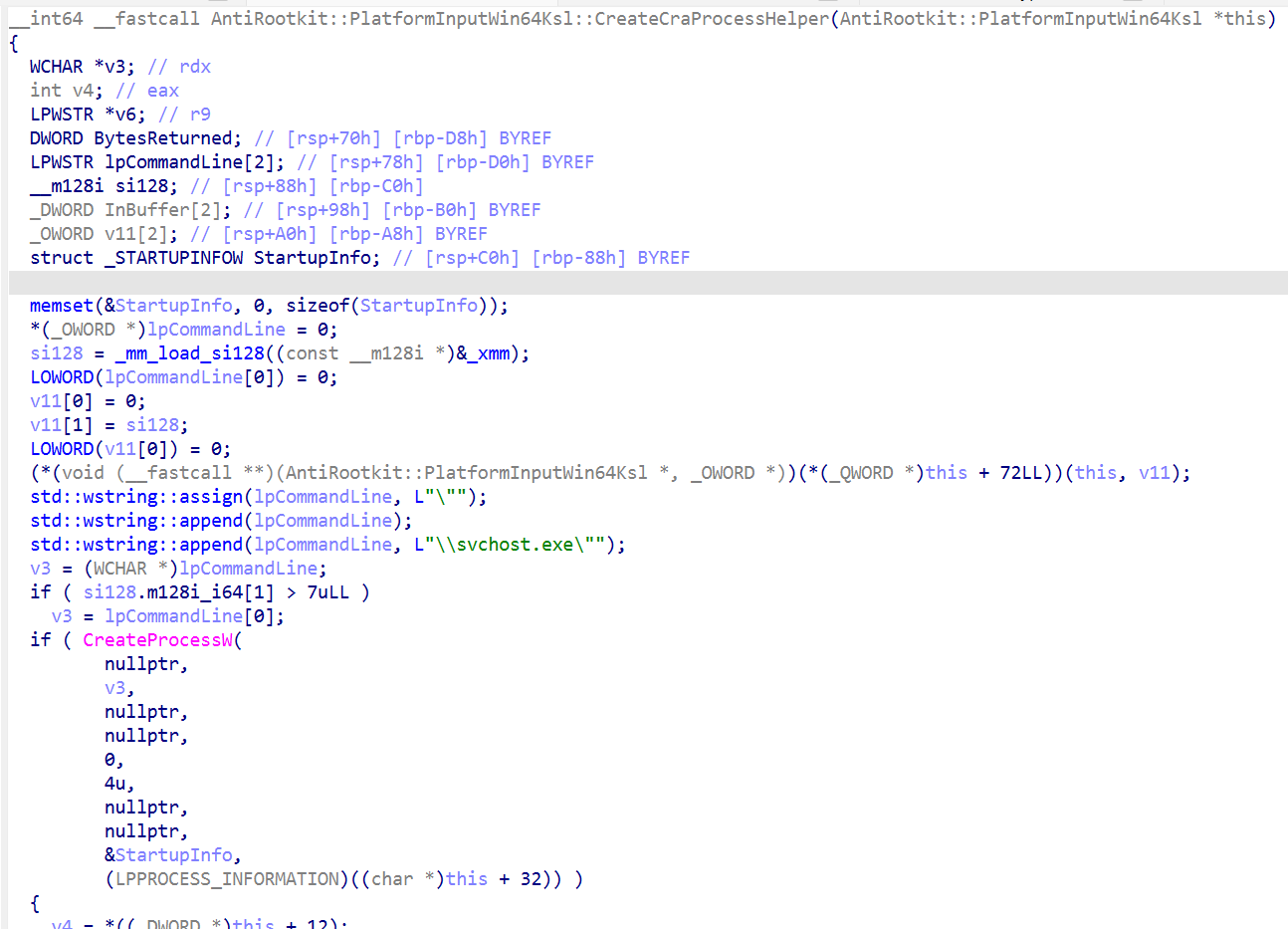
Now we are in the right place. Time to explain things properly.
The full chain to the interesting function looks something like this:
mpengine.dll
  -> ArScanTask::CompletionCallback
    -> ArScanTask::Scan
      -> ArScan::ScanHelperWin3264
        -> AntiRootkit::PlatformInputWin64Ksl::PlatformInputWin64Ksl(...)
          -> AntiRootkit::PlatformInputWin64Ksl::Init
            -> AntiRootkit::PlatformInputWin64Ksl::EnumerateDeviceMemoryRanges
            -> AntiRootkit::PlatformInputWin64Ksl::CreateCraProcessHelper
From the function names, we can already guess that this is part of the anti-rootkit scanner.
ArScan::ScanHelperWin3264 creates a PlatformInputWin64Ksl object.

Its constructor calls Init, and Init does a few things before the process is created, and it goes something like this:
PlatformInputWin64Ksl::Init
  -> DeviceIoControl(KSL, 0x222044, op = 0)   // query KSL version
  -> DeviceIoControl(KSL, 0x222044, op = 0xB) // query capability, if supported
  -> WrapperK32EnumPageFilesW(...)
  -> EnumerateDeviceMemoryRanges()
  -> CreateCraProcessHelper()
Basically it sends some IOCTLs to the KSL driver to query the version and capabilities, and then it calls CreateCraProcessHelper.
CreateCraProcessHelper, builds the command line by hand, and it looks something like this:
this->GetSystemDirectoryW(systemDir);

cmd = L"\"";
cmd += systemDir;
cmd += L"\\svchost.exe\"";
So the final command line will look something like this (might differ slightly on other builds):
"C:\Windows\System32\\svchost.exe"Note that the
C:\Windows\System32part is obtained dynamically throughGetSystemDirectoryW. So, in rare cases where the system directory is different, it will be reflected as such.
Then it calls CreateProcessW like this:
CreateProcessW(
    NULL,
    L"\"<SystemDirectory>\\svchost.exe\"",
    NULL,
    NULL,
    FALSE,
    CREATE_SUSPENDED,
    NULL,
    NULL,
    &StartupInfo,
    &ProcessInformation
)
The most surprising thing here is, the process is created with the CREATE_SUSPENDED flag. Read the appendix for why that is the case.
Once this run, is where we see the svchost.exe process in the process tree :D
For the sake of completeness, if we keep following the code, after the process is created, we see the engine takes the new process id from PROCESS_INFORMATION and sends it to the KSL driver:
input[0] = 8;
input[1] = ProcessInformation.dwProcessId;

DeviceIoControl(
    ksl_handle,
    0x222044,
    input,
    8,
    NULL,
    0,
    &bytes_returned,
    NULL
)
Appendix - How Is That Suspended Svchost Used?#
Welcome to the most interesting part of the writeup, dear curious reader.
In the previous section we left off just when the IOCTL with operation 8 is sent to the KSL driver. To get more insight, we need to look at the KSL driver itself ksld.sys.
The interesting function to start with for our use case is CDeviceKsl::DeviceControl.
Note: I am going to present a heavily beautified version of the code, skipping over unnecessary things for ease of reading.
void CDeviceKsl::DeviceControl(
    WDFQUEUE queue,
    WDFREQUEST request,
    size_t output_buffer_length,
    size_t input_buffer_length,
    ULONG ioctl)
{
    NTSTATUS status = STATUS_UNSUCCESSFUL;
    void *input_buffer = NULL;
    void *output_buffer = NULL;
    size_t bytes_returned = output_buffer_length;

    status = CDeviceBase::RetrieveBuffer(
        WdfRequestRetrieveInputBuffer,
        request,
        &input_buffer,
        input_buffer_length);
    if (status < 0)
        goto complete;

    status = CDeviceBase::RetrieveBuffer(
        WdfRequestRetrieveOutputBuffer,
        request,
        &output_buffer,
        bytes_returned);
    if (status < 0)
        goto complete;

    WDFDEVICE device = WdfIoQueueGetDevice(queue);
    auto context = WdfObjectGetTypedContextWorker(device, &WDF_CONTROL_DEVEXT_TYPE_INFO);

    if (context && context->device)
    {
        status = context->device->OpDeviceControl(
            ioctl,
            input_buffer,
            input_buffer_length,
            output_buffer,
            &bytes_returned);

        if (status >= 0 && bytes_returned)
            WdfRequestSetInformation(request, bytes_returned);
    }
    else
    {
        status = STATUS_INVALID_DEVICE_REQUEST;
    }

complete:
    WdfRequestComplete(request, status);
}
We do not necessarily care about what this does, we just move to the next function it calls with the IOCTL, which is CDeviceKsl::OpDeviceControl.
NTSTATUS CDeviceKsl::OpDeviceControl(
    ULONG ioctl,
    DWORD *input,
    size_t input_size,
    void *output,
    size_t *bytes_returned)
{
    if (input_size < sizeof(DWORD) || ioctl != 0x222044)
        return STATUS_INVALID_DEVICE_REQUEST;

    DWORD operation = input[0];

    for (size_t i = 0; i < this->command_count; i++)
    {
        CCommandBase *command = this->commands[i];

        if (command && command->IsSupported(operation))
        {
            return command->Handle(
                operation,
                input,
                input_size,
                output,
                bytes_returned);
        }
    }

    return STATUS_NOT_SUPPORTED;
}
Basically this acts as the IOCTL dispatcher. Once we see the IOCTL code 0x222044, it reads input[0] (the operation number sent from CreateCraProcessHelper). If the operation is supported we call the handler which in this case is CCommand::Handle. Here is an overview of it.
NTSTATUS CCommand::Handle(
    DWORD operation,
    void *input,
    size_t input_size,
    void *output,
    size_t *bytes_returned)
{
    switch (operation)
    {
    case 0:
        ...
        ...
        ...
        *(WORD *)output = 0x104;
        *bytes_returned = 2;
        return STATUS_SUCCESS;

    case 1:
        if (input_size < 0x18)
            return STATUS_UNSUCCESSFUL;

        // 0x1400058D0
        //   mov rax, [rcx+0x28]
        //   retn
        helper_process = vtable_call_(device + 0x30); // This should return CDeviceKsl+0x58

        return this->kslIoctlGetPhysicalMemory(
            input,
            input_size,
            output,
            output_size,
            bytes_returned,
            helper_process);

    case 2:
        if (input_size < 8)
            return STATUS_UNSUCCESSFUL;

        device_object = device->GetDeviceObject();

        return this->kslIoctlGetCpuRegisters(
            device_object,
            input,
            input_size,
            output,
            output_size,
            bytes_returned);

    case 7:
        if (input_size < 0xC)
            return STATUS_UNSUCCESSFUL;

        return this->kslIoctlGetRoutineAddr(
            input,
            input_size,
            output,
            output_size,
            bytes_returned);

    case 8:
        if (input_size < 8)
            return STATUS_UNSUCCESSFUL;

        return device->SetConnectionHelper(((DWORD *)input)[1]);

    // 0xB == 11
    case 0xB:
        if (input_size < 4)
            return STATUS_UNSUCCESSFUL;

        if (output_size < 1)
            return STATUS_INVALID_PARAMETER;

        *(BYTE *)output = this->MmCopyMemory != NULL;
        *bytes_returned = 1;
        return STATUS_SUCCESS;

    case 0xC:
        if (input_size < 0x20)
            return STATUS_UNSUCCESSFUL;

        return this->kslIoctlMmCopy(
            input,
            input_size,
            output,
            output_size,
            bytes_returned);

    default:
        return STATUS_UNSUCCESSFUL;
    }
}
Here is a summary of the supported operations:
| Operation | Description |
|---|---|
| 0x0 | Query KSL interface version. |
| 0x1 | Read physical memory through kslIoctlGetPhysicalMemory. |
| 0x2 | Read CPU register state through kslIoctlGetCpuRegisters. |
| 0x7 | Resolve a kernel routine address with MmGetSystemRoutineAddress. |
| 0x8 | Register the suspended helper process PID with the driver. |
| 0xB | Ask whether the MmCopyMemory based path is available. |
| 0xC | Use the MmCopyMemory based copy path. |
For our use case, we care about operation 8.
case 8:
    if (input_size < 8)
        return STATUS_UNSUCCESSFUL;

    return device->SetConnectionHelper(((DWORD *)input)[1]); // PID
input[1] in this case is the PID of the suspended svchost.exe we mentioned before. We call SetConnectionHelper next.
CDeviceKsl::SetConnectionHelper(...)
{
  ...
  ...
  ...
  ZwOpenProcess(
      &process_handle,
      0x80000000,
      &object_attributes,
      &ClientId
  );

  ObReferenceObjectByHandle(
      process_handle,
      0x80000000,
      PsProcessType,
      KernelMode,
      &process_object,
      NULL
  );

  ZwClose(process_handle);
  this->connection_helper_process = process_object;
  // Btw, we store this at CDeviceKsl+0x58.
  // Later, when the same object is reached through IDevice (see operation 1 access request)
  // subobject at CDeviceKsl+0x30, this field is read as IDevice+0x28.
}
The CDeviceKsl::SetConnectionHelper basically calls ZwOpenProcess to open a kernel handle to the PID, then ObReferenceObjectByHandle to make that handle into a referenced process object, which is stored for later use.
The "later use" happens when the anti-rootkit scanner reads physical memory. On
the engine side:
mpengine.dll
  -> AntiRootkit::PlatformInputWin64Ksl::ReadPhysicalMemory
That function does a couple of things but the important part is that it sends an IOCTL with operation 1 to read physical memory.
input[0] = 1; // operation 1 == read physical memory
input[1] = 0;
input[2..3] = physical_address;
input[4..5] = size;

DeviceIoControl(
    ksl_handle,
    0x222044,
    input,
    0x18,
    output_buffer,
    size,
    &bytes_returned,
    NULL
)
Back in ksld.sys, we've established that operation 1 from CCommand::Handle:
CCommand::Handle(1, ...)
  -> device->connection_helper_process getter
  -> CCommand::kslIoctlGetPhysicalMemory(..., helper_process)
And this is where the suspended svchost.exe process object finally gets used.
kslIoctlGetPhysicalMemory receives that process object and does the following:
KeStackAttachProcess(helper_process, &ApcState);
ZwOpenSection("\\device\\physicalmemory", ...);
ZwMapViewOfSection(...)
memmove(output_buffer, mapped_physical_memory, size);
ZwUnmapViewOfSection(NtCurrentProcess(), mapped_view);
KeUnstackDetachProcess(&ApcState);
Basically the svchost process is used as a host for mapping the \device\physicalmemory section. So that it's later analyzed by the engine.
The TL;DR of the whole flow is something like this:
mpengine.dll anti-rootkit scanner
  -> initializes KSL
  -> creates svchost.exe suspended
  -> registers the helper PID with ksld.sys using op 8

ksld.sys
  -> opens the PID
  -> stores it as the KSL connection helper

<later>

mpengine.dll
  -> asks KSL to read physical memory using op 1

ksld.sys
  -> attaches to the helper process
  -> maps \device\physicalmemory in that process context
  -> copies the requested bytes into the IOCTL output buffer
  -> returns the bytes to mpengine.dll

mpengine.dll
  -> analyzes the returned bytes
That's pretty much it. Hope you enjoyed this deep dive as much as I did :D