This is a quick look at fondue.exe internals. If you are interested in how it works read on.
| Default location |
|---|
| C:\Windows\System32\fondue.exe |
| C:\Windows\SysWOW64\fondue.exe |
Summary#
Here is a quick summary from Microsoft documentation:
Enables Windows optional features by downloading required files from Windows Update or another source specified by Group Policy. The manifest file for the feature must already be installed in your Windows image.Looking at this in details via IDA however reveals that fondue.exe is just a small loader for the real Feature on Demand UI, which is implemented in APPWIZ.CPL. The main value of fondue.exe is that it can detect rude apps (full-screen DirectDraw things or a foreground window covering the monitor) and provide the ability to force it on top.
Here is a quick overview of the wWinMain flow:
- Look for
/top-mostin the rawlpCmdLine. - If
/top-mostis present, callIsRudeAppPresent. - If a rude app is present, create and switch to a temporary desktop named
FondueDesktop. - Load
APPWIZ.CPL. - Resolve the
RunFODWexport. - Call
RunFODW.
Let's look at these steps in a bit more detail.
I have a writeup for APPWIZ.CPL in Windows Process Internals - Appwiz.CPL. Check it out to learn the other half of the story.
wWinMain Flow#
Here is a beautified pseudocode version of wWinMain:
int __stdcall wWinMain(
    HINSTANCE hInstance,
    HINSTANCE hPrevInstance,
    LPWSTR lpCmdLine,
    int nShowCmd)
{
    if (wcsstr(lpCmdLine, L"/top-most") && IsRudeAppPresent())
    {
        originalDesktop = GetThreadDesktop(GetCurrentThreadId());
        if (!originalDesktop)
            return HRESULT_FROM_WIN32(GetLastError());

        fondueDesktop = CreateDesktopW(
            L"FondueDesktop",
            NULL,
            NULL,
            0,
            GENERIC_ALL,
            NULL);

        if (!fondueDesktop ||
            !SetThreadDesktop(fondueDesktop) ||
            !SwitchDesktop(fondueDesktop))
        {
            status = HRESULT_FROM_WIN32(GetLastError());
            goto cleanup;
        }
    }

    sessionId = 0xFFFFFFFF;
    if (!ProcessIdToSessionId(GetCurrentProcessId(), &sessionId) || sessionId != 0)
    {
        status = CoInitialize(NULL);
        if (status >= 0)
        {
            status = CoInitializeSecurity(NULL, -1, NULL, NULL, 3, 3, NULL, 0, NULL);
            if (status >= 0)
            {
                HMODULE appwiz = LoadLibraryW(L"APPWIZ.CPL");
                FARPROC runFodW = appwiz ? GetProcAddress(appwiz, "RunFODW") : NULL;

                if (runFodW)
                    status = runFodW(0, hInstance, lpCmdLine, nShowCmd);
                else
                    status = HRESULT_FROM_WIN32(ERROR_NOT_SUPPORTED);
            }

            CoUninitialize();
        }
    }
    else
    {
        status = E_FAIL;
    }

cleanup:
    if (originalDesktop)
    {
        SwitchDesktop(originalDesktop);
        SetThreadDesktop(originalDesktop);
    }

    if (fondueDesktop)
        CloseDesktop(fondueDesktop);

    return IS_HRESULT_FROM_WIN32(status) ? LOWORD(status) : status;
}
From main we can see that the logic is kinda straightforward. The only interesting part is the IsRudeAppPresent check and the desktop switching logic. Let's look at that and then explain the handoff to APPWIZ.CPL.
Is a Rude App Present?#
BOOL IsRudeAppPresent()
{
    HWND foregroundWindow = GetForegroundWindow(); // ForegroundWindow
    BOOL ddrawExclusiveBusy = FALSE;               // v1

    HANDLE checkMutex = OpenMutexW(
        SYNCHRONIZE,
        FALSE,
        L"Local\\__DDrawCheckExclMode__");         // v3

    if (checkMutex)
    {
        if ((WaitForSingleObject(checkMutex, 30) & ~0x80) == WAIT_OBJECT_0)
        {
            HANDLE exclusiveMutex = OpenMutexW(
                SYNCHRONIZE,
                FALSE,
                L"Local\\__DDrawExclMode__");      // v5

            if (exclusiveMutex)
            {
                DWORD waitResult = WaitForSingleObject(exclusiveMutex, 0); // v6

                if ((waitResult & ~0x80) != 0)
                    ddrawExclusiveBusy = waitResult == WAIT_TIMEOUT;
                else
                    ReleaseMutex(exclusiveMutex);

                CloseHandle(exclusiveMutex);
            }

            ReleaseMutex(checkMutex);
        }

        CloseHandle(checkMutex);

        if (ddrawExclusiveBusy)
            return TRUE;
    }

    int foregroundBand = 0;       // v10
    HMONITOR monitor = NULL;      // v8
    RECT monitorRect = {0};       // rcSrc2
    RECT windowRect = {0};        // Rect
    RECT overlapRect = {0};       // rcDst

    if (!GetWindowBand(foregroundWindow, &foregroundBand) || foregroundBand != 1)
        return FALSE;

    monitor = MonitorFromWindow(foregroundWindow, MONITOR_DEFAULTTOPRIMARY);
    GetMonitorRects(monitor, &monitorRect); // Return value is ignored by the caller.

    return GetWindowRect(foregroundWindow, &windowRect)
        && IntersectRect(&overlapRect, &windowRect, &monitorRect)
        && !IsRectEmpty(&overlapRect)
        && EqualRect(&windowRect, &monitorRect);
}
IsRudeAppPresent basically checks for two conditions:
- DirectDraw exclusive-mode mutex state.
- A foreground full-monitor window in window band
1.
The DirectDraw part uses these mutex names:
Local\__DDrawCheckExclMode__
Local\__DDrawExclMode__
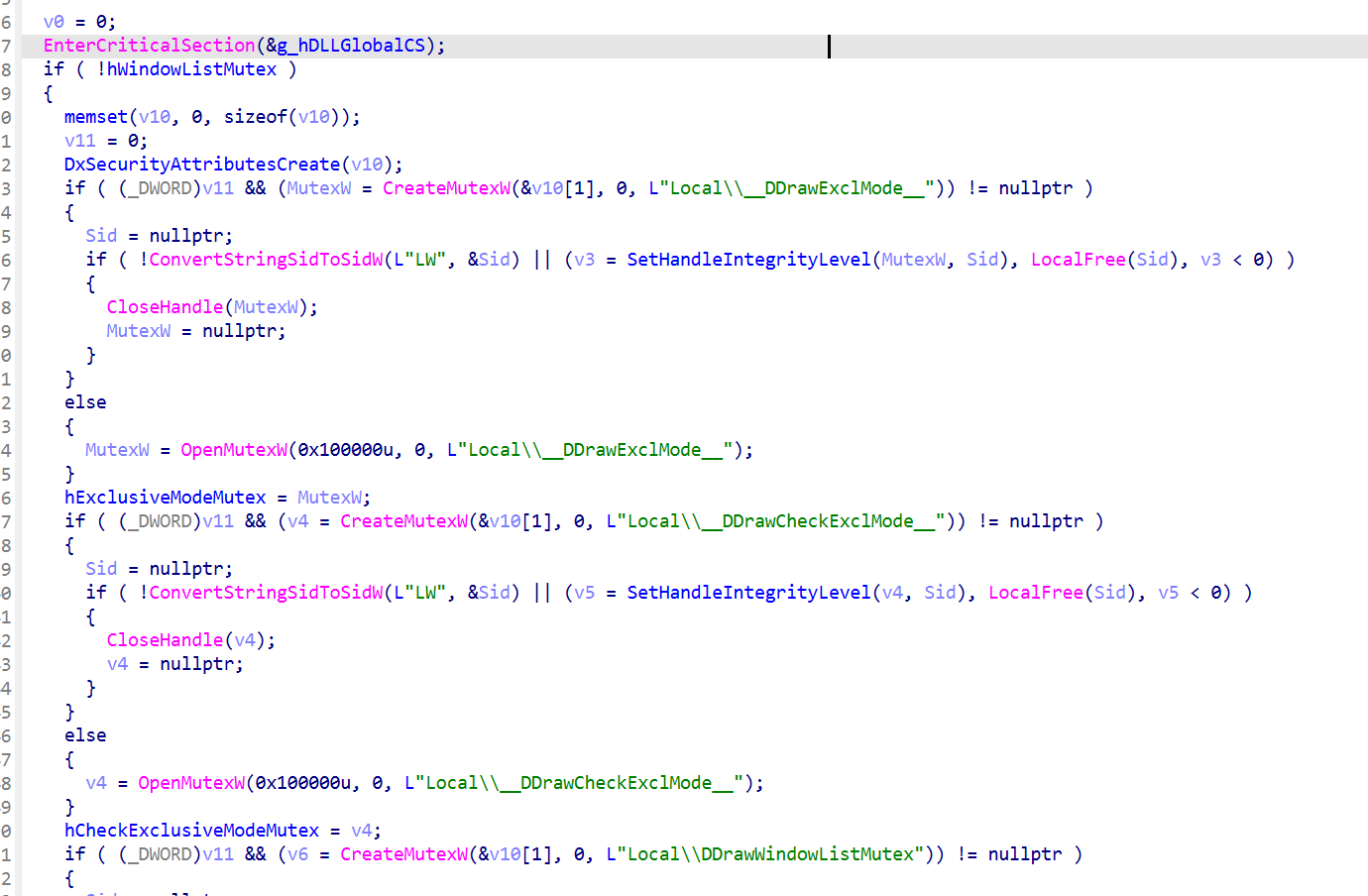
These mutex names can be found for example in ddraw.dll, where the CreateMutexes function creates or opens them as part of the global DirectDraw synchronization state:
What does this mean for fondue you ask? Let's look at how the mutex is being used:
// checkMutex == __DDrawCheckExclMode__
WaitForSingleObject(checkMutex, 30);
// exclusiveMutex == __DDrawExclMode__
waitResult = WaitForSingleObject(exclusiveMutex, 0);

if (waitResult == WAIT_TIMEOUT)
    ddrawExclusiveBusy = TRUE;
else
    ReleaseMutex(exclusiveMutex);
We wait for __DDrawCheckExclMode__ with a 30ms timeout. If that wait succeeds, we then try to wait for __DDrawExclMode__ with a zero timeout. If that second wait returns WAIT_TIMEOUT, it means that __DDrawExclMode__ is currently owned by some other process, which is a strong indication that a DirectDraw exclusive-mode app is running.
The second condition is in the same spirit but not related to DirectDraw. It checks if the foreground window is in window band 1 and does some other shenanigans to check if the foreground window is covering the entire monitor. Read this for a bit more context.
GetWindowBand(foregroundWindow, &foregroundBand);
GetWindowRect(foregroundWindow, &windowRect);
EqualRect(&windowRect, &monitorRect);
But the TL;DR of all of this is that IsRudeAppPresent is trying to detect if there is a rude app AKA an application that might be covering the screen and preventing the FoD UI from being visible.
Hey, What does the /top-most Flag Do?#
Continuing from the above, the /top-most flag ensures that the FoD UI is always visible. The way it does that is by switching to a temporary desktop named FondueDesktop via a combintion of CreateDesktopW, SetThreadDesktop, and SwitchDesktop:
if (wcsstr(lpCmdLine, L"/top-most") && IsRudeAppPresent())
{
    HDESK originalDesktop = GetThreadDesktop(GetCurrentThreadId());

    HDESK fondueDesktop = CreateDesktopW(
        L"FondueDesktop",
        NULL,
        NULL,
        0,
        GENERIC_ALL,
        NULL);

    SetThreadDesktop(fondueDesktop);
    SwitchDesktop(fondueDesktop);

    RunFODW(...);

    SwitchDesktop(originalDesktop);
    SetThreadDesktop(originalDesktop);
    CloseDesktop(fondueDesktop);
}
Loading APPWIZ.CPL And Calling RunFODW#
Alright back to actual security stuff. Here is the part where fondue.exe loads APPWIZ.CPL.
HMODULE appwiz = LoadLibraryW(L"APPWIZ.CPL");
if (appwiz)
{
    runFodW = GetProcAddress(appwiz, "RunFODW");
    if (runFodW)
        runFodW(0, hInstance, lpCmdLine, nShowCmd);
}
What this tells us is that the real work of parsing the CLI and actually "enabling the Windows optional features" is done by APPWIZ.CPL.
__int64 RunFODW(
    HWND hwnd,
    HINSTANCE unused,
    wchar_t *cmdLine,
    int unusedShowCmd)
{
    return OpenFOD(hwnd, cmdLine, 0);
}
Which means the flags documented on MSDN are actually flags understood by APPWIZ.CPL. I did a writeup on APPWIZ.CPL as well, so if you want to know more about how the CLI parsing works and what the flags do, check out Windows Process Internals - Appwiz.CPL.
Wait a Minute, What About DLL Side-Loading?#
For the astute reader, you might have noticed that fondue.exe does a LoadLibraryW(L"APPWIZ.CPL") without specifying a full path. This means that the normal DLL search order applies, and we can side-load a malicious APPWIZ.CPL if we copy it to a custom dir.
Here is a screenshot of procmon showing calc.exe spawning from fondue.exe.

This is not new btw, Adam talked about this a couple years back - See 1 little known secret of fondue.exe