Summary#
Datacollector is a utility that's part of the Microsoft Visual Studio test platform that allows for tracing and collecting information about a binary.
| Paths |
|---|
| \dotnet\sdk<VERSION>\TestHostNetFramework\datacollector.exe |
| \Microsoft Visual Studio<YEAR>\Community\Common7\IDE\Extensions\TestPlatform\datacollector.exe |
| \Microsoft Visual Studio<YEAR>\Community\Common7\IDE\CommonExtensions\Microsoft\TestWindow\VsTest\TestHostNetFramework\datacollector.exe |
Note
If you wanna test this directly without reading the details you can jump directly here
Proxy Execution Through AttachVs#
This LOLBin story starts the same as many .NET based LOLBins. Decompiling Datacollector.exe will reveal a function named AttachVs that's part of the DebuggerBreakpoint class. This function makes a call to Start method from Process class. Which means it'll eventually starts a process somehow. The goal is to identify if we're able to reach that function and if we have control over it.

The function call stack to reach the AttachVs function and the Start method specifically goes something like this:
- Main -> Run -> AttachVisualStudioDebugger -> AttachVs
Let's dive into these functions and check what condition are needed in order for us to achieve code execution.
Main#
public static void Main(string[]? args)
{
    try
    {
        new DataCollectorMain().Run(args);
    }
    catch (Exception ex)
    {
        ...
        ...
    }
    finally
    {
        ...
        ...
    }
}
From main we can see a direct call to run with our passed arguments via the command line. This is good as we crossed the first function that we need, unto Run.
Run#
public void Run(string[]? args)
{
    DebuggerBreakpoint.AttachVisualStudioDebugger(WellKnownDebugEnvironmentVariables.VSTEST_DATACOLLECTOR_DEBUG_ATTACHVS);
    DebuggerBreakpoint.WaitForDebugger(WellKnownDebugEnvironmentVariables.VSTEST_DATACOLLECTOR_DEBUG);

    var argsDictionary = CommandLineArgumentsHelper.GetArgumentsDictionary(args);

    // Setup logging if enabled
    if (argsDictionary.TryGetValue(LogFileArgument, out var logFile))
    {
        ...
        ...
        ...
    }
    ...
    ...
    ...
}
The run function is a bit lengthy, but fortunately for us the call to the function we're interested in is the first one.
An argument called WellKnownDebugEnvironmentVariables.VSTEST_DATACOLLECTOR_DEBUG_ATTACHVS is passed on to it. We'll see how its used later, unto the next function.
AttachVisualStudioDebugger#
This is where the call to AttachVs occurs but before we reach that we need to clear some conditions.
internal static void AttachVisualStudioDebugger(string environmentVariable)
    {
        ...
        ...
        ...
        var debugEnabled = Environment.GetEnvironmentVariable(environmentVariable);
        if (!string.IsNullOrEmpty(debugEnabled) && !debugEnabled.Equals("0", StringComparison.Ordinal))
        {
            ...
            ...
            ...
        }
    }
We first need to pass the condition set above which verifies that an environment variable is set and not equal to 0. If you remember from the previous call a variable WellKnownDebugEnvironmentVariables.VSTEST_DATACOLLECTOR_DEBUG_ATTACHVS was passed. Its basically referring to the variable VSTEST_DATACOLLECTOR_DEBUG_ATTACHVS.
All we have to do is set it before we execute the binary in order to reach this section of the code.
set VSTEST_DATACOLLECTOR_DEBUG_ATTACHVS=1As this variable is actually used by the program to determine if we wanna attach a debugger and so forth. There are some additional checks to determine if we set a PID or not.
In our use case we don't care as no matter what we choose we'll alway call the AttachVs so we'll analyze that next.
AttachVs#
private static bool AttachVs(Process process, int? vsPid)
{
    // The way we attach VS is not compatible with .NET Core 2.1 and .NET Core 3.1, but works in .NET Framework and .NET.
    // We could call the library code directly here for .NET, and .NET Framework, but then we would also need to package it
    // together with testhost. So instead we always run the executable, and pass path to it using env variable.

    const string env = "VSTEST_DEBUG_ATTACHVS_PATH";
    var vsAttachPath = Environment.GetEnvironmentVariable(env) ?? FindAttachVs();

    // Always set it so we propagate it to child processes even if it was not previously set.
    Environment.SetEnvironmentVariable(env, vsAttachPath);

    if (vsAttachPath == null)
    {
        throw new InvalidOperationException($"Cannot find AttachVS.exe tool.");
    }

    if (!File.Exists(vsAttachPath))
    {
        throw new InvalidOperationException($"Cannot start tool, path {vsAttachPath} does not exist.");
    }
    var attachVsProcess = Process.Start(vsAttachPath, $"{process.Id} {vsPid}");
    attachVsProcess.WaitForExit();

    return attachVsProcess.ExitCode == 0;
}
The Start method expects a vsAttachPath variable, that is set in 2 ways.
- Via an environement variable called
VSTEST_DEBUG_ATTACHVS_PATH - If the env variable doesn't exist a call to
FindAttachVsis made to retrieve the value.
We'll start with the straight forward way which is setting the env variable.
set VSTEST_DEBUG_ATTACHVS_PATH=C:\Windows\System32\calc.exeThis will launch the binary referenced as a child process of datacollector.exe
In case the variable isn't set a call is made to FindAttachVs
private static string? FindAttachVs()
{
    var fromPath = FindOnPath("AttachVS.exe");
    if (fromPath != null)
    {
        return fromPath;
    }

    // Don't use current process MainModule here, it resolves to dotnet if you invoke
    // dotnet vstest.console.dll, or dotnet testhost.dll. Use the entry assembly instead.
    var parent = Path.GetDirectoryName(Assembly.GetEntryAssembly()!.Location);
    while (parent != null)
    {
        var path = Path.Combine(parent, @"artifacts\bin\AttachVS\Debug\net472\AttachVS.exe");
        Debug.WriteLine($"Looking for AttachVS in: {path}.");
        if (File.Exists(path))
        {
            return path;
        }

        parent = Path.GetDirectoryName(parent);
    }

    return parent;
}
Which basically performs 2 things to look for the AttachVS.exe binary.
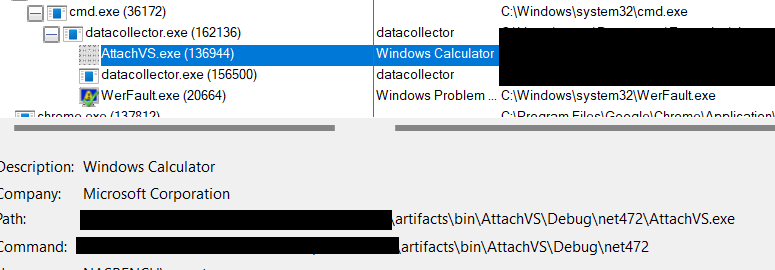
Search in the Path environment variable for the binary using the FindOnPath function or look for the following folder structure from the current path of execution artifacts\bin\AttachVS\Debug\net472\AttachVS.exe
TL;DR#
We can proxy execution through the datacollector binary via the following method.
-
Setting the following env variable to any value > 0 -
set VSTEST_DATACOLLECTOR_DEBUG_ATTACHVS=1 -
Choose one of the following methods to select the binary to execute
- Set the env variable
VSTEST_DEBUG_ATTACHVS_PATHto the value of your binary -set VSTEST_DEBUG_ATTACHVS_PATH=C:\Windows\System32\calc.exe. - Add a binary named
AttachVS.exeto any folder reachable from the %PATH% env variable. - Create a folder with the following structure directly starting from the directory of execution of
datacollectorthat contains a binary namedAttachVS.exe-mkdir artifacts\bin\AttachVS\Debug\net472\
- Set the env variable
Appendix#
In case you want to copy the datacollector binary outside of its original location. The following DLLs are required for its execution and must be part of the PATH.
Microsoft.TestPlatform.CommunicationUtilities.dllMicrosoft.TestPlatform.CoreUtilities.dllMicrosoft.TestPlatform.PlatformAbstractions.dllMicrosoft.VisualStudio.TestPlatform.Common.dllMicrosoft.VisualStudio.TestPlatform.ObjectModel.dllNewtonsoft.Json.dll