Summary#
StandaloneRunner.exe is a utility included with the Windows Driver Kit (WDK) used for testing and debugging drivers on Windows systems. It allows developers to execute and debug driver packages in a standalone environment without needing to install them on a target system.
| Paths |
|---|
C:\Program Files (x86)\Windows Kits\10\Testing\StandaloneTesting\Internal\arm\standalonerunner.exe |
C:\Program Files (x86)\Windows Kits\10\Testing\StandaloneTesting\Internal\arm64\standalonerunner.exe |
C:\Program Files (x86)\Windows Kits\10\Testing\StandaloneTesting\Internal\x64\standalonerunner.exe |
C:\Program Files (x86)\Windows Kits\10\Testing\StandaloneTesting\Internal\x86\standalonerunner.exe |
Note
If you wanna test this directly without reading the details you can jump directly here
Investigating The Source#
As one does while hunting for new LOLBINs, I was investigating the source code of windows application written in .NET and I stumbled upon the StandaloneRunner.exe utility. One function in particular caught my eye which was the RunCommand function.
public static void RunCommand(string cmd)
{
    cmd = TestRunnerUtil.ParseParams(cmd, TestRunner.GlobalParams);
    ProcessStartInfo startInfo = new ProcessStartInfo();
    startInfo.WorkingDirectory = TestRunner.WorkingDir.FullName;
    startInfo.UseShellExecute = false;
    startInfo.RedirectStandardOutput = true;
    startInfo.RedirectStandardError = true;
    startInfo.FileName = "CMD.exe";
    startInfo.Arguments = "cmd /c " + cmd;
    Console.WriteLine(string.Format((IFormatProvider) CultureInfo.CurrentCulture, "Running {0}", new object[1]
    {
        (object) cmd
    }));
    Process p = Process.Start(startInfo);
    if (cmd.Contains("te.exe"))
        TestRunner.RunTAEF(p);
    p.WaitForExit();
}
From a first glance, it seems that we have a function that accepts a command as a parameter and execute it via cmd.exe. The next set of steps was to read through the code and try to find a way to reach the call to this function.
Tracing Execution#
Checking the callers of the RunCommand function, we find 2 functions referencing it. Namely HandleReboot part of TestManager.cs and RunTest part of TestRunner.cs and
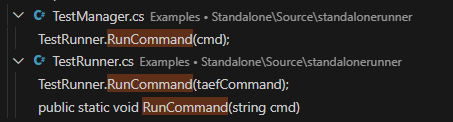
While RunTest is interesting, I will not be covering it in this writeup. Instead i'll be focusing on HandleReboot.
private static void HandleReboot()
{
    string[] strArray = File.ReadAllLines("reboot.rsf");
    string str = strArray[0];
    TestManager.interactive = bool.Parse(strArray[1]);
    TestRunner.Init(str, "..\\..\\Results");
    bool flag1 = false;
    int num;
    for (num = 0; num < 60 || flag1; ++num)
    {
    bool flag2 = false;
    foreach (FileSystemInfo file in TestRunner.WorkingDir.GetFiles())
    {
        if (file.Name.Equals("rsf.rsf"))
        flag2 = true;
    }
    if (!flag2)
    {
        Process[] processesByName = Process.GetProcessesByName("Te");
        if (processesByName.Length >= 1)
        {
        Console.WriteLine("Waiting for TAEF.");
        processesByName[0].WaitForExit();
        flag1 = true;
        }
        else
        {
        TestRunner.CopyResults();
        Console.WriteLine("TAEF finished running.");
        TestManager.PromptForExit();
        TestManager.CleanupAndExit(0);
        }
    }
    else
        Thread.Sleep(1000);
    }
    if (num != 60)
    return;
    Console.WriteLine("Warning: reboot state file was found, but TAEF did not run.  Manually restarting.");
    string cmd = File.ReadAllText("command.txt");
    Directory.SetCurrentDirectory(Path.Combine(str, "working"));
    TestRunner.RunCommand(cmd);
    TestRunner.CopyResults();
    Console.WriteLine("TAEF finished running.");
    TestManager.PromptForExit();
    TestManager.CleanupAndExit(0);
}
Keeping with the same idea and tracing who's calling HandleReboot we find a call from Main.
public static void Main(string[] args)
{
    Directory.SetCurrentDirectory(Path.GetDirectoryName(Assembly.GetExecutingAssembly().Location));
    if (File.Exists("reboot.rsf"))
    TestManager.HandleReboot();
    ....
    ....
    ....
}
This means we only need to trigger a call to HandleReboot and it'll call RunCommand for us. Let's do that.
Achieving Arbitrary Execution#
First from main we see that there's a check for a file called reboot.rsf in the current directory of execution. If it exists a call is made to HandleReboot.
if (File.Exists("reboot.rsf"))
    TestManager.HandleReboot();
That's the first step. We need to create a file with that name.
Stepping inside the HandleReboot function we see that the contents of the reboot.rsf are being read. Specifically parsing the first line as a string to passing it to a function called Init. Whilst the 2nd line is parsed as a boolean value in order to potentially the value of a variable called Interactive.
private static void HandleReboot()
{
    string[] strArray = File.ReadAllLines("reboot.rsf");
    string str = strArray[0];
    TestManager.interactive = bool.Parse(strArray[1]);
    TestRunner.Init(str, "..\\..\\Results");
    ....
    ....
    ....
}
In our use case the Interactive value isn't going to be used. The only thing we need to make sure, is to provide a valid value inside of the file. Both True and False will pass the call.
We're more interested in the Init function as their might be other condition we need to pass. So we'll look at it next.
public static void Init(string testDir, string resultsDir)
{
    TestRunner.WorkingDir = TestRunner.MakeWorkingDir(testDir);
    TestRunner.OutputDir = new DirectoryInfo(Path.Combine(resultsDir, DateTime.Now.ToString("yyyyMMddHHmmss", (IFormatProvider) CultureInfo.CurrentCulture) + "_" + Path.GetFileName(testDir)));
}
This functions has 2 purposes basically. Setting up a new working directory via the MakeWorkingDir function and creating an output directory where the results of the execution would "theoretically" be saved.
Let's look at MakeWorkingDir first.
public static DirectoryInfo MakeWorkingDir(string testDir)
{
    string path = Path.Combine(testDir, "working");
    if (Directory.Exists(path))
    return new DirectoryInfo(path);
    DirectoryInfo directory = Directory.CreateDirectory(Path.Combine(testDir, "working"));
    foreach (string file in Directory.GetFiles(testDir))
    File.Copy(file, Path.Combine(directory.FullName, Path.GetFileName(file)), true);
    foreach (string file in Directory.GetFiles(Path.Combine("..\\..\\Setup", TestRunner.architecture)))
    File.Copy(file, Path.Combine(directory.FullName, Path.GetFileName(file)), true);
    return directory;
}
The function makes combined path with our input directory read from the reboot.rsf first line and a directory called working. If this new directory hierarchy exists it returns, else it creates it and copy some files.
For our case we're gonna take the easy way out. In order to bypass this function we're gonna make sure a directory structure with the hierarchy <custom_name>\working\ exists and reachable from the execution directory.
Continuing from the Init function. As the resultsDir variable value is hardcoded in the code with a relative path ..\\..\\Results. We just need to make sure that the location 2 directory above is writable.
Now that we took care of the Init function "conditions" let's move on to the next step which is a loop.
bool flag1 = false;
int num;
for (num = 0; num < 60 || flag1; ++num)
{
bool flag2 = false;
foreach (FileSystemInfo file in TestRunner.WorkingDir.GetFiles())
{
    if (file.Name.Equals("rsf.rsf"))
    flag2 = true;
}
if (!flag2)
{
    Process[] processesByName = Process.GetProcessesByName("Te");
    if (processesByName.Length >= 1)
    {
    Console.WriteLine("Waiting for TAEF.");
    processesByName[0].WaitForExit();
    flag1 = true;
    }
    else
    {
    TestRunner.CopyResults();
    Console.WriteLine("TAEF finished running.");
    TestManager.PromptForExit();
    TestManager.CleanupAndExit(0);
    }
}
else
    Thread.Sleep(1000);
}
This loop is executed 60 times (as long as flag1 is also False but that doesn't matter to use and you'll see why in a bit) and for every execution it'll loop on every file inside the "WorkingDir" to look for a file called rsf.rsf to set the value of flag2 to True (this will be important in a moment).
After that it checks if flag2 is still False it'll execute some code, but if it's true, it'll sleep for 1 second.
Note
The content of
WorkingDirif you remember was set in theInitfunction and is<custom_name>\working\
To bypass this loop we just need to create a file named rsf.rsf inside of our WorkingDir (i.e <custom_name>\working\) and wait 1 minute (60 sleeps)
Next is the final step before reaching the RunCommand function.
Console.WriteLine("Warning: reboot state file was found, but TAEF did not run.  Manually restarting.");
string cmd = File.ReadAllText("command.txt");
Directory.SetCurrentDirectory(Path.Combine(str, "working"));
TestRunner.RunCommand(cmd);
TestRunner.CopyResults();
Console.WriteLine("TAEF finished running.");
TestManager.PromptForExit();
TestManager.CleanupAndExit(0);
The command to be executed is read from a file called command.txt and that's it. Now we have arbitrary command execution. Let's put all of this together.
Putting Everything Together#
To recap. In order to achieve command execution we need the following.
-
Copy
standalonerunner.exeandstandalonexml.dllto a directory of your choosing. -
Create a file named
reboot.rsfinside the execution directory and fill it with the following content.
myTestDir
True-
Mimick the expected results of
MakeWorkingDirby creating the following hierarchy from the execution directorymyTestDir\working. -
Create a file named
rsf.rsfand copy insidemyTestDir\working. -
Create a file named
command.txtin the execution directory and fill it with the following content.
calcThat's it!
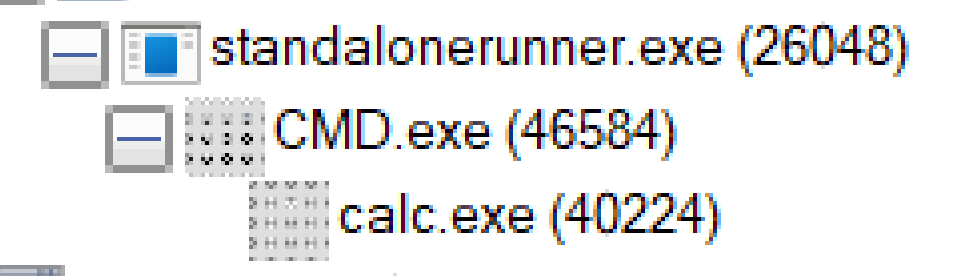
Once you execute standalonerunner.exe and wait 60 seconds you should see a calculator pop up.
Note
A small caveat if you want to test this.
The COM{0D972387-817B-46E7-913F-E9993FF401EB}class needs to be registered on the system in order for this binary to work.
You can do so by calling regsvr32 as follows.
regsvr32 "C:\Program Files (x86)\Windows Kits\10\Testing\Runtimes\WDTF\RunTime\WDTF.DLL"
This will not be an issue in machines using the utility already.