Summary#
Source: https://www.netlimiter.com/
| Details | Value |
|---|---|
| Location | C:\Program Files\Locktime Software\NetLimiter\PSRun.exe |
| OriginalFileName | PSRun.exe |
| Sha256 | 61523655fe229431ea5ee3ab5d9966fb547490f102ad074524b5a98a0f458d0c |
| Require Admin | Yes |
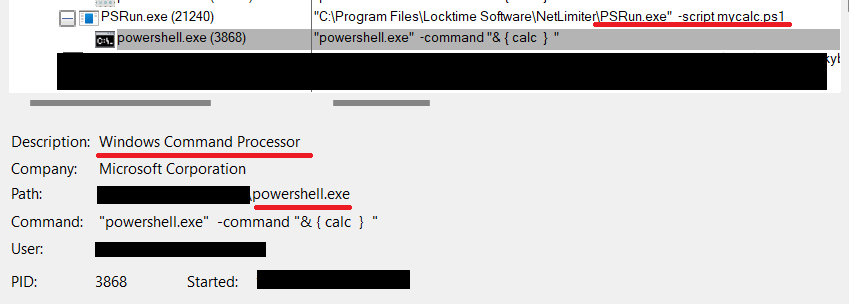
The PSRun.exe utility as the name suggest is a utility that basically is a wrapper around powershell. Take a script as input and execute it via the command powershell.exe -command "& { calc }". It can be abused to run arbitrary powershell from the context of this signed process (which can be interesting in some cases). It can also executes any binary placed in the folder of execution named powershell.exe
Description#
The binary starts by doing simple checks on the arguments.
while (true)
      {
        switch (args1)
        {
          case "-command":
            this._errorMessage += "The '-command' argument is not allowed.";
            break;
          case "-file":
            this._errorMessage += "The '-file' argument is not allowed.";
            break;
          case "-h":
          case "-help":
          case "/?":
          case "/help":
            goto label_8;
          case "-script":
            this._scriptFileName = Program.ParseArgs(args, ref ix, true);
            if (this._scriptFileName == null)
              this._errorMessage += "Script file name missing.\n";
            for (string args2 = Program.ParseArgs(args, ref ix, true); args2 != null; args2 = Program.ParseArgs(args, ref ix, true))
              str1 = str1 + " \"" + args2 + "\"";
            break;
          case null:
            goto label_12;
          default:
            str2 = str2 + " " + args1;
            break;
        }
        args1 = Program.ParseArgs(args, ref ix);
      }
label_8 is pointing to the ShowHelp function
label_8:
      this.ShowHelp();
      return 0;
The interesting arguments then becomes the -script which takes us to label_12
label_12:
      if (this._errorMessage != null)
        return this.OnError(this._errorMessage);
      if (this._scriptFileName == null)
        return this.OnError("The required '-script' argument is missing");
      try
      {
        foreach (string readAllLine in File.ReadAllLines(this._scriptFileName))
          str3 = str3 + readAllLine.Replace("\"", "\\\"") + "\n";
      }
      catch (Exception ex)
      {
        return this.OnError("Failed to load the script", ex);
      }
      string path = Path.GetDirectoryName(Process.GetCurrentProcess().MainModule.FileName) + "\\ActivationConfig";
      try
      {
        this._activationFolder = Directory.CreateDirectory(path);
        using (StreamWriter text = File.CreateText(path + "\\powershell.exe.activation_config"))
        {
          text.WriteLine("<?xml version='1.0'?>");
          text.WriteLine("<configuration>");
          text.WriteLine("<startup useLegacyV2RuntimeActivationPolicy='true'>");
          text.WriteLine("<supportedRuntime version='v4.0.30319'/>");
          text.WriteLine("<supportedRuntime version='v2.0.50727'/>");
          text.WriteLine("</startup>");
          text.WriteLine("</configuration>");
        }
      }
      catch (Exception ex)
      {
        return this.OnError("Failed to create the .activation_config file.", ex);
      }
      string str4 = str1.Replace("\"", "\\\"");
      ProcessStartInfo startInfo = new ProcessStartInfo();
      startInfo.EnvironmentVariables.Add("COMPLUS_ApplicationMigrationRuntimeActivationConfigPath", path);
      startInfo.FileName = "powershell.exe";
      startInfo.Arguments = str2 + " -command \"& { " + str3 + " } " + str4 + " \"\n";
      startInfo.UseShellExecute = false;
      startInfo.CreateNoWindow = this._silent;
      try
      {
        Process.Start(startInfo).WaitForExit();
      }
      catch (Exception ex)
      {
        return this.OnError("Failed to launch powershell", ex);
      }
      return 0;
After checking that the value of -script is provided, the content is read and " (double quotes) are escaped
try
      {
        foreach (string readAllLine in File.ReadAllLines(this._scriptFileName))
          str3 = str3 + readAllLine.Replace("\"", "\\\"") + "\n";
      }
      catch (Exception ex)
      {
        return this.OnError("Failed to load the script", ex);
      }
After this some additional checks and configuration are performed to ensure that the powershell instance can load newer version of .NET even if the user is running an older version of powershell.
This is achieved via an activation_config file. Read more here and here.
string path = Path.GetDirectoryName(Process.GetCurrentProcess().MainModule.FileName) + "\\ActivationConfig";
      try
      {
        this._activationFolder = Directory.CreateDirectory(path);
        using (StreamWriter text = File.CreateText(path + "\\powershell.exe.activation_config"))
        {
          text.WriteLine("<?xml version='1.0'?>");
          text.WriteLine("<configuration>");
          text.WriteLine("<startup useLegacyV2RuntimeActivationPolicy='true'>");
          text.WriteLine("<supportedRuntime version='v4.0.30319'/>");
          text.WriteLine("<supportedRuntime version='v2.0.50727'/>");
          text.WriteLine("</startup>");
          text.WriteLine("</configuration>");
        }
      }
      ...
      ...
      ...
The interesting part comes just after. Where we can see that powershell.exe is being called directly with the content of the provided script as argument to the -command flag.
 ProcessStartInfo startInfo = new ProcessStartInfo();
      startInfo.EnvironmentVariables.Add("COMPLUS_ApplicationMigrationRuntimeActivationConfigPath", path);
      startInfo.FileName = "powershell.exe";
      startInfo.Arguments = str2 + " -command \"& { " + str3 + " } " + str4 + " \"\n";
      startInfo.UseShellExecute = false;
      startInfo.CreateNoWindow = this._silent;
      try
      {
        Process.Start(startInfo).WaitForExit();
      }
      ...
      ...
      ...
We can abuse this in one of two ways:
- The first is intended. i.e we can run any powershell script via the context of this signed binary.
- The second, since the
powershell.exebinary isn't specified via a full path. Windows will apply the search order where it'll first start checks for the presence of a file calledpowershell.exein the current directory. Meaning if we place a file and call itpowershell.exe. We can then execute it from the context ofPSRun.exe