Note
While this is located in the LOLBIN folder of this repo, I wasn't able to do anything with this finding. This is just here to document the finding itself. Please do check out the following tweet for more context on this finding.
Summary#
If you have the OneDrive application (Windows APP version) on Windows you can modify the download history file located in C:\Users\XXX\AppData\Local\Packages\microsoft.microsoftskydrive_8wekyb3d8bbwe\LocalState\AppData\OneDriveDownloads.txt to create fake entries that will be shown in the OneDrive download history interface.
The file is a list of JSON (dicts in python) entries that contain information about downloaded files via the OneDrive App. Here is an example:
[{"serialNumber":7,"fileName":"file_one.txt","fileNameOnDisk":"file_one.txt","status":1,"accountType":"ODC","progress":"55.68 KB","retryEnabled":true,"retryTimes":0}]The entries are as follow
serialNumber: A sequence number to track the number of downloaded files. It increases with every download.fileName: The name of the downloaded file often time it's equal tofileNameOnDisk.fileNameOnDisk: The filename on disk.status: The status of the download. Has the following value:- 1: Download Complete.
- 2: Download Failed.
- 3: Download Failed.
- 4: Deleted or Moved.
accountType: TBD.progress: Size of the downloaded file.retryEnabled: If true a button to retry the download will be shown. Else nothing is shown.retryTimes: Download retry count
The idea here is we can add new entries to this file/list and the OneDrive app will gladly show them as "legitimate" entries. We simply change the "fileName" and "fileNameOnDisk" to point to other files on disk.
Example#
[{"serialNumber":7,"fileName":"OpSec.txt","fileNameOnDisk":"OpSec.txt","status":2,"accountType":"ODC","progress":"55.68 KB","retryEnabled":true,"retryTimes":0}, {"serialNumber":8,"fileName":"Click Me.exe","fileNameOnDisk":"Click Me.exe","status":1,"accountType":"ODC","progress":"55.68 KB","retryEnabled":true,"retryTimes":0}]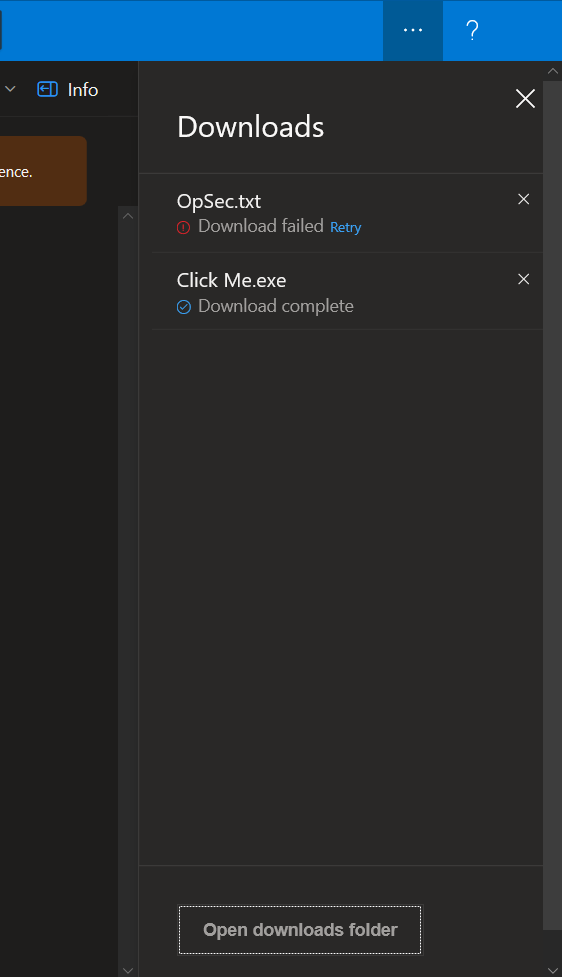
As pointed out at the start. The "sad" thing is that you can't point the fileNameOnDisk to binaries in order to trick the user or use this as a potential persistence. Since the binaries won't auto open and execute.