Introduction#
Sometimes when DISM, or a PowerShell cmdlet that uses the DISM module such as Get-WindowsOptionalFeature, is run, a child DismHost.exe process is spawned from a temporary directory like this:
C:\Users\<user>\AppData\Local\Temp\<GUID>\DismHost.exeC:\Windows\Temp\<GUID>\DismHost.exe
This happens when DISM decides to run an image session from a sandbox directory. It is a temporary staging directory where DISM copies the binaries it needs and then loads the image session from there.
Note
Offline image sessions are the easiest way to trigger this behavior. Online sessions usually run in-place, but
/sandboxcan force DISM into the hosted session path. Combining it with/ScratchDirallows control over where the temporary directory gets created.
DismCore Session Decision#
The temporary directory decision is made in %SystemRoot%\System32\Dism\dismcore.dll. The two interesting functions are:
CDISMManager::CreateImageSessionCDISMManager::CreateImageSessionFromLocation
CreateImageSession sets up the image-session state and then calls CreateImageSessionFromLocation. One of the checks compares the image path with the online Windows directory:
GetOnlineWindowsDir(..., &onlineWindowsDir);
sameAsOnlineWindows = _wcsicmp(onlineWindowsDir, imagePhysicalLocation) == 0;
GetOnlineWindowsDir is a small helper around GetSystemWindowsDirectoryW. It gives DismCore the Windows directory for the currently running OS, so on a normal install this ends up as:
onlineWindowsDir = C:\WindowsIt also derives the drive root from that path, so the pair is effectively:
onlineWindowsRoot = C:\
onlineWindowsDir  = C:\Windows
The exact drive can change if Windows is installed somewhere else, but the idea is the same. This is how DISM recognizes that an image session is really targeting the live OS instead of an offline image mounted somewhere like C:\Mount.
The most useful branch is in CreateImageSessionFromLocation. Simplified, it looks like this:
if (!GetEnvironmentVariableW(
        sandboxOverride,
        L"DISM_SANDBOX_OVERRIDE_BINARIES_PATH",
        MAX_PATH) &&
    noSandbox)
{
    Log(L"No Sandbox was created, DISM running in-place.");
    imageSessionLocation = dismSourcePath;
}
else
{
    CGuidFolders::CreateGuidSubFolder(&manager->GuidFolders, secure, imageSessionLocation);
    CopyDirectory(dismSourcePath, imageSessionLocation);
}
The important part is that the in-place path requires two things:
DISM_SANDBOX_OVERRIDE_BINARIES_PATHis not set.- The caller selected the no-sandbox path.
If those conditions are true, DISM logs:
No Sandbox was created, DISM running in-place.Otherwise, DISM creates a GUID directory under the scratch directory and copies the image-session files there. This is why offline servicing tends to produce a temporary DismHost.exe, while normal online servicing often uses %SystemRoot%\System32\Dism directly.
What Gets Copied#
When the sandbox branch is used, DismCore creates a GUID subfolder under the scratch directory. CGuidFolders::CreateGuidSubFolder calls CoCreateGuid, formats the GUID with StringFromGUID2, creates the directory, and tracks it for cleanup.
CreateImageSessionFromLocation then copies the DISM provider location into the GUID folder. For an offline image-session sandbox, the function also handles extra files needed for offline servicing:
- It copies the source DISM directory into the GUID folder.
- It copies
wdscore.dll. - It copies the
downleveldirectory. - It copies
ssshim.dllwhen present. - It creates a Windows directory under the target image path when needed.
- It can copy additional files from
DISM_SANDBOX_OVERRIDE_BINARIES_PATHinto the sandbox.
A Small Detour - DISM_SANDBOX_OVERRIDE_BINARIES_PATH#
The DISM_SANDBOX_OVERRIDE_BINARIES_PATH env variable has two separate effects.
The first effect is, if DISM_SANDBOX_OVERRIDE_BINARIES_PATH is set, DismCore creates a temporary GUID directory for the DISM files.
Without the variable, DISM may decide to use %SystemRoot%\System32\Dism directly and log:
No Sandbox was created, DISM running in-place.The second effect is on what gets copied. When the variable contains a directory path, DISM still copies the normal DISM image-session directory first, then tries to copy additional files from the override path into the same sandbox folder.
So a quick test can look like this:
New-Item -ItemType Directory -Force C:\Temp\DismOverride | Out-Null
'hello' | Set-Content C:\Temp\DismOverride\marker.txt

$env:DISM_SANDBOX_OVERRIDE_BINARIES_PATH = 'C:\Temp\DismOverride'

dism /online /get-packages /scratchdir:C:\Temp\DismScratch /sandbox /logpath:C:\Temp\dism-sandbox.log /loglevel:4
Scratch Directory Setup#
According to Microsoft's documentation, ScratchDir is used when extracting files for temporary use during servicing. It is also the base directory used for the temporary GUID sandbox folder.
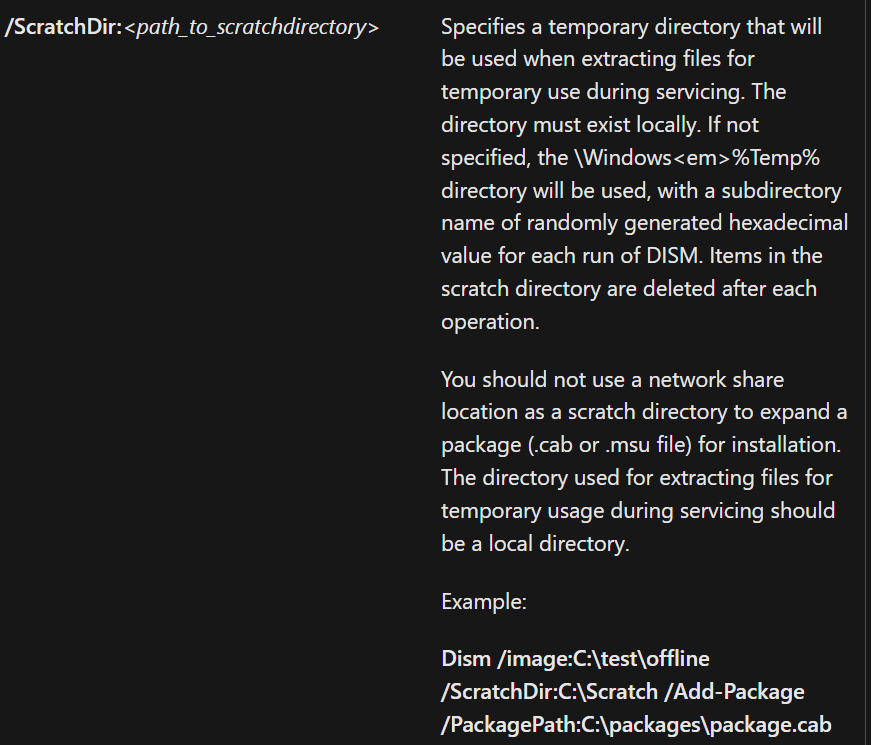
CDISMManager::FinalConstruct initializes a default scratch directory early. One of the log messages for this path is:
Temporarily setting the scratch directory. This may be overridden by user later.It gets the default path through GetTempDirectory(). That helper calls WdsGetTempPath, which dynamically tries to resolve GetTempPath2W. If GetTempPath2W is unavailable, it falls back to GetTempPathW.
When a caller supplies /ScratchDir, CDISMManager::put_ScratchDir stores the value and initializes the GUID-folder helper with that path. That means the temporary DismHost.exe location should move under the caller-specified scratch directory when the sandbox branch is used.
Testing With /Sandbox#
To test this, we can force the behavior with the undocumented /sandbox flag:
dism /online /get-packages /ScratchDir:[path-to-scratch-dir] /sandboxYou can monitor the C:\Windows\Logs\DISM\dism.log file for information about the mode used.
- Sandbox Mode Not Used Example
2024-01-04 20:52:13, Info   DISM   DISM Manager: PID=5704 TID=26812 Copying DISM from "C:\Windows\System32\Dism" - CDISMManager::CreateImageSessionFromLocation
2024-01-04 20:52:13, Info   DISM   DISM Manager: PID=5704 TID=26812 No Sandbox was created, DISM running in-place. - CDISMManager::CreateImageSessionFromLocation
2024-01-04 20:52:14, Info DISM DISM Manager: PID=5704 TID=26812 Successfully loaded the ImageSession at "C:\Windows\System32\Dism" - CDISMManager::LoadRemoteImageSession- Sandbox Mode Example
2024-01-04 20:49:12, Info   DISM   DISM Manager: PID=30216 TID=47688 Copying DISM from "C:\Windows\System32\Dism" - CDISMManager::CreateImageSessionFromLocation
2024-01-04 20:49:15, Info   DISM   DISM Manager: PID=30216 TID=47688 Successfully loaded the ImageSession at "C:\Users\xxx\AppData\Local\Temp\B473CFA4-799B-4FCE-B5DF-28C333DB7769" - CDISMManager::LoadRemoteImageSession
...
2024-01-04 20:49:16, Info   DISM   DISM Manager: PID=30216 TID=47688 Image session successfully loaded from location: C:\Users\xxx\AppData\Local\Temp\B473CFA4-799B-4FCE-B5DF-28C333DB7769 - CDISMManager::CreateImageSession
DismHost.exe is the out-of-process COM host used after DismCore has decided where the image-session binaries should live. I wrote a quick write-up about that part here: DismHost - Command-Line, COM Registration, and DLL Loading.
Appendix#
Undocumented Flags#
The following flags are not documented in the public DISM Command-Line Options and DISM Global Options for Command-Line Syntax pages.
| Flag | Description |
|---|---|
/provider:<name> | Routes command registration through a named DISM provider |
/sandbox | Forces the hosted image-session path |
/sandbox:<path> | Supplies a DISM binaries/session root path |
/servicingstack:<path> | TBD |
/showtags | TBD |
The useful ones here are:
/sandbox- Makes DISM take the hosted image-session path even for online operations that would normally use the local DISM directory./sandbox:<path>- If we provide an actual path to this flag, DISM treats it as a binaries/session path. AKA it will load the session binaries from that path instead of copying them into a GUID temp folder./provider:<name>- DISM has a local provider store, providers register commands, and the CLI wrapper can ask that store for commands belonging to a specific provider.
Undocumented Environment Variable#
| Variable | Observed behavior |
|---|---|
DISM_SANDBOX_OVERRIDE_BINARIES_PATH | Forces the sandbox branch in CreateImageSessionFromLocation and, when populated, is used as a source path for additional files copied into the sandbox. |
PowerShell Cmdlets#
The following PowerShell cmdlets use the DISM library and might trigger this behavior.
- Add-AppProvisionedPackage
- Add-AppProvisionedSharedPackageContainer
- Add-AppxProvisionedPackage
- Add-ProvisionedAppPackage
- Add-ProvisionedAppSharedPackageContainer
- Add-ProvisionedAppxPackage
- Add-WindowsCapability
- Add-WindowsDriver
- Add-WindowsImage
- Add-WindowsPackage
- Apply-WindowsUnattend
- Clear-WindowsCorruptMountPoint
- Disable-WindowsOptionalFeature
- Dismount-WindowsImage
- Enable-WindowsOptionalFeature
- Expand-WindowsCustomDataImage
- Expand-WindowsImage
- Export-WindowsCapabilitySource
- Export-WindowsDriver
- Export-WindowsImage
- Get-AppProvisionedPackage
- Get-AppProvisionedSharedPackageContainer
- Get-AppxProvisionedPackage
- Get-NonRemovableAppsPolicy
- Get-ProvisionedAppPackage
- Get-ProvisionedAppSharedPackageContainer
- Get-ProvisionedAppxPackage
- Get-WIMBootEntry
- Get-WindowsCapability
- Get-WindowsDriver
- Get-WindowsEdition
- Get-WindowsImage
- Get-WindowsImageConten
- Get-WindowsOptionalFeature
- Get-WindowsPackage
- Get-WindowsReservedStorageState
- Mount-WindowsImage
- New-WindowsCustomImage
- New-WindowsImage
- Optimize-AppProvisionedPackages
- Optimize-AppxProvisionedPackages
- Optimize-ProvisionedAppPackages
- Optimize-ProvisionedAppxPackages
- Optimize-WindowsImage
- Remove-AppProvisionedPackage
- Remove-AppProvisionedSharedPackageContainer
- Remove-AppxProvisionedPackage
- Remove-ProvisionedAppPackage
- Remove-ProvisionedAppSharedPackageContaine
- Remove-ProvisionedAppxPackage
- Remove-WindowsCapability
- Remove-WindowsDriver
- Remove-WindowsImage
- Remove-WindowsPackage
- Repair-WindowsImage
- Save-SoftwareInventory
- Save-WindowsImage
- Set-AppPackageProvisionedDataFile
- Set-AppXProvisionedDataFile
- Set-NonRemovableAppsPolicy
- Set-ProvisionedAppPackageDataFile
- Set-ProvisionedAppXDataFile
- Set-WindowsEdition
- Set-WindowsProductKey
- Set-WindowsReservedStorageState
- Split-WindowsImage
- Start-OSUninstall
- Update-WIMBootEntr
- Use-WindowsUnattend