Introduction#
Compatibility SHIMs are a mechanism in Windows used to trick application by "faking" results and redirecting API calls. The idea is to make older application work on modern versions of Windows without actually touching their code. Windows comes with a built-in database called sysmain.sdb that provides many SHIMS, Layers, QUIRKS and predefined application fixes.
Usually if one wants to add a new application fix, they need to create a new SHIM database with the help of the Compatibility Administrator utility (Compatadmin.exe) or perhaps be brave and use the Application Compatibility Database API provided in Apphelp.dll.
Focusing on the Compatadmin.exe tool, an issue arise when we try to create an application fix that will use custom SHIMS. As the tool doesn't allow us to lookup non built-in SHIMS it can be tricky.
Compatadmin Patching For The Rescue#
The way to do it so far, was to actually use a hidden or I should say an integrated utility used by Compatadmin.exe itself called ShimDBC. This utility is used to compile the fixes that a user might create via the GUI into the actual .sdb.
The late Geoff Chappell did an excellent writeup a couple of years ago on how to patch Compatadmin itself in order to use ShimDBC.
Fleex's Lab also did a follow up on how to patch the newer version of Compatadmin that I also recommend.
While this was a good way so far to use this tool, it's still a bit tedious as there isn't a version of ShimDBC laying around for us to download.
What if we try to actually find the mysterious ShimDBC.
Enter Standard User Analyzer#
Back in the XP days the Compatibility Administrator also shipped with a tool called QFixApp that also bundled the infamous ShimDBC but was later removed.
QFixApp is a small application that provides an interface to the database of compatibility fixes included with the operating system - MSDN
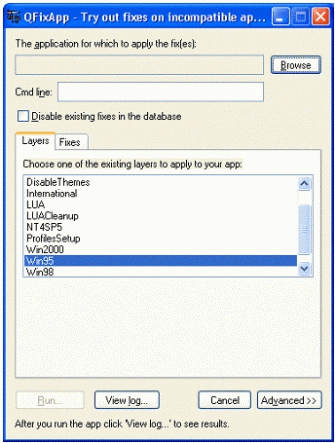
Nowadays if you download the latest version of Application Compatibility Toolkit (ACT) you'll get 2 utilities.
- The Compatibility Administrator in both 64bit and 32bit versions
- Standard User Analyzer (SUA)
Our focus will be on the Standard User Analyzer set of tools. Here is an excerpt from Microsoft's documentation
The Application Compatibility Toolkit includes the Standard User Analyzer (SUA) tool and the Standard User Analyzer Wizard (SUA Wizard). These tools enable you to test your applications and to monitor API calls in order to detect potential compatibility issues due to the User Account Control (UAC) feature in the Windows 7 operating system.TL;DR is this utility allows us to test an application for potential compatibility issues, if found it suggest some SHIMS/Fixes to be applied.
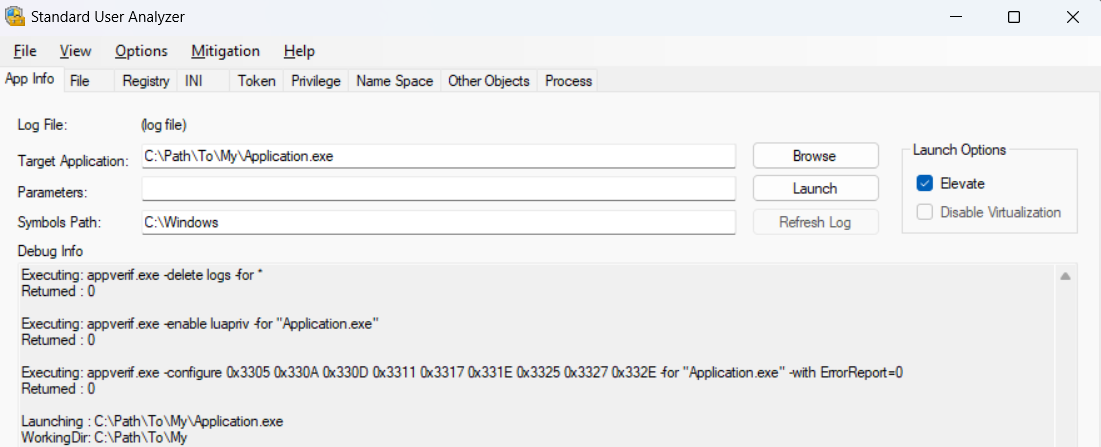
Once we execute our binary and issues have been found, we can choose to either "apply" the suggested mitigation or "export" it as an .MSI file.
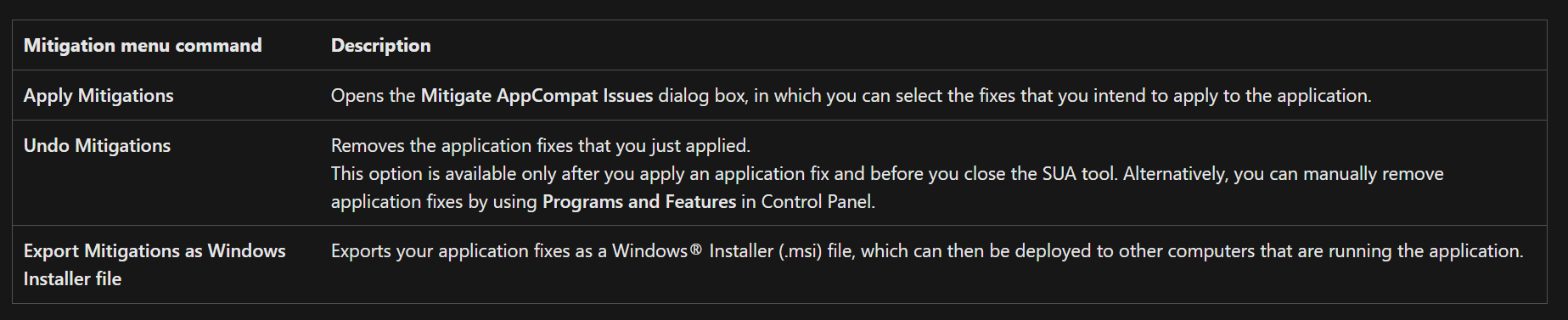
Choosing the later would launch a set of commands that are of interest to us.
C:\Program Files (x86)\Windows Kits\10\Assessment and Deployment Kit\Application Compatibility Toolkit\Standard User Analyzer\fixApp.exe "C:\Users\xxx\AppData\Local\Temp\testapp.exe.xml" "C:\Users\xxx\AppData\Local\Temp\SUAMitig.sdb"

%SystemRoot%\system32\makecab.exe -f "C:\Users\xxx\AppData\Local\Temp\SUAMitig.ddf"

C:\Program Files (x86)\Windows Kits\10\Assessment and Deployment Kit\Application Compatibility Toolkit\Standard User Analyzer\SUAnalyzerSrv.exe modifymsi "C:\Users\xxx\Documents\testapp.msi" "Mitigation for testapp.exe (Generated by SUA - 01/01/2024 10:11:22)" {34563dba-e5fe-4f03-9150-2c4c5b4491fa} "C:\Users\xxx\AppData\Local\Temp\SUAMitig.cab" "C:\Users\xxx\AppData\Local\Temp\SUAMitig.vbs"
Exporting the mitigations as an .MSI file did a couple of things
- Create an
.SDBdatabase from an XML file using thefixApp.exeutility - Execute
makecabwith a directive file generated by SUA that contains information about what files to include inside the.cabfile - Bundle everything into the
.MSIusingSUAnalyzerSrv.exe
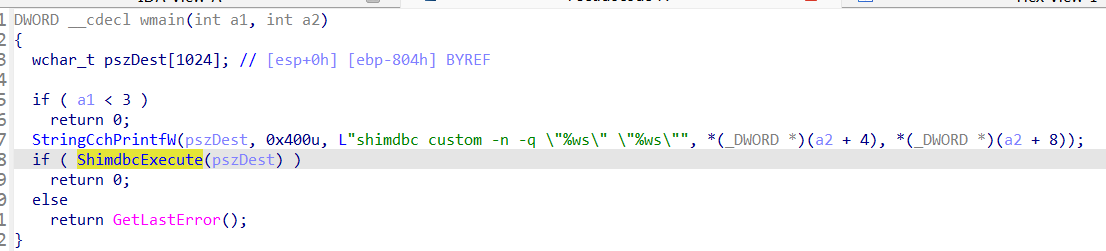
The first thing that jumps to us in this chain is fixApp.exe tool that was able to create .SDB file based on an .XML. This sounds exactly like ShimDBC. Investigating the binary in IDA will reveal that it's actually the same ShimDBC (almost) included in Compatadmin. But we didn't have to patch anything we have the utility accepting an XML and outputting and SDB directly :)
Note
In reality and as Geoff stated in his writeup,
ShimDBCdoesn't exist as a standalone utility and probably never will.fixAppis just a wrapper that uses theShimDBCimplementation. But this is the closest thing we got to the real thing :)
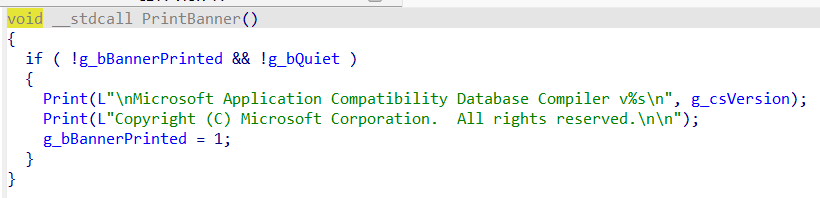
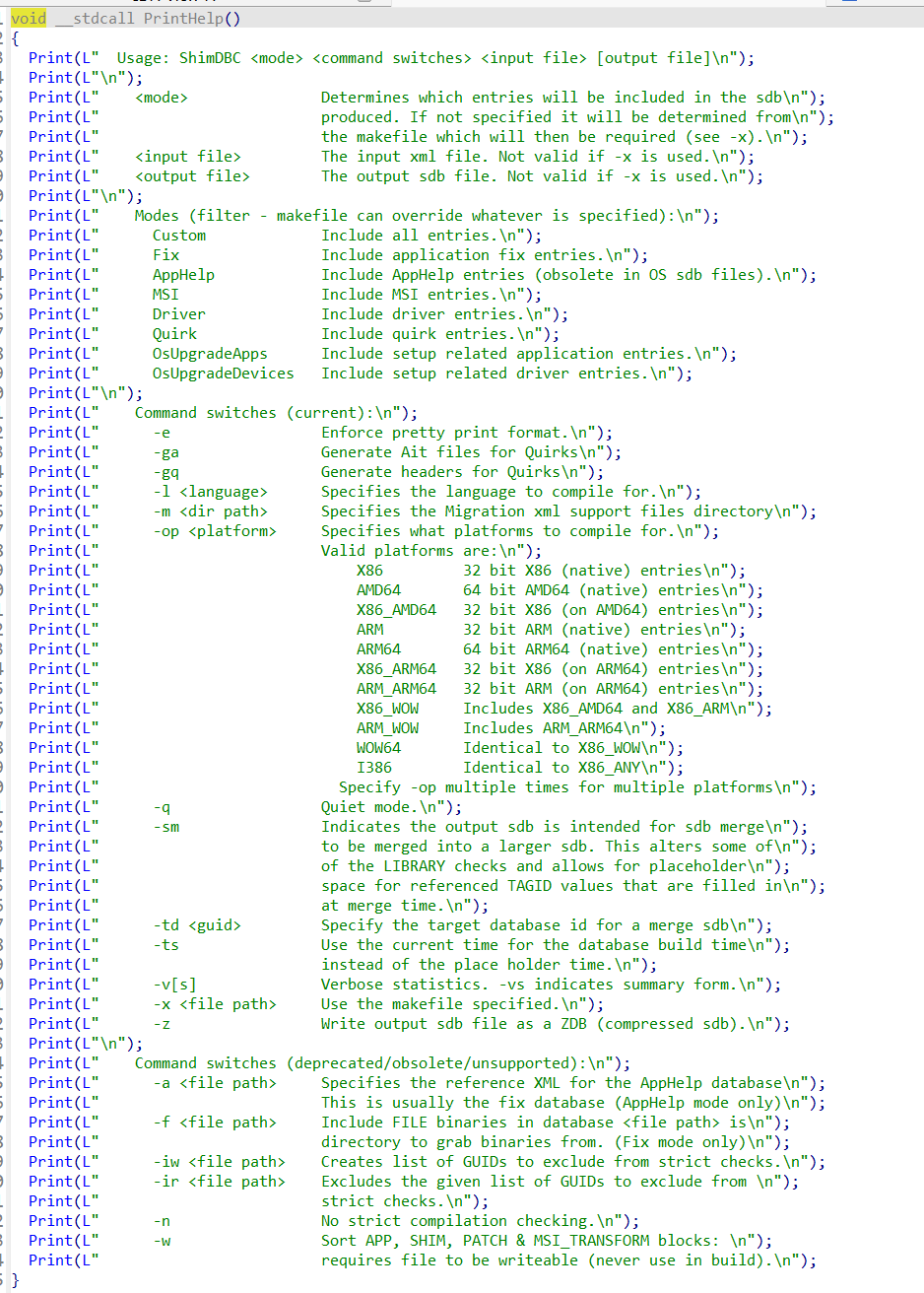
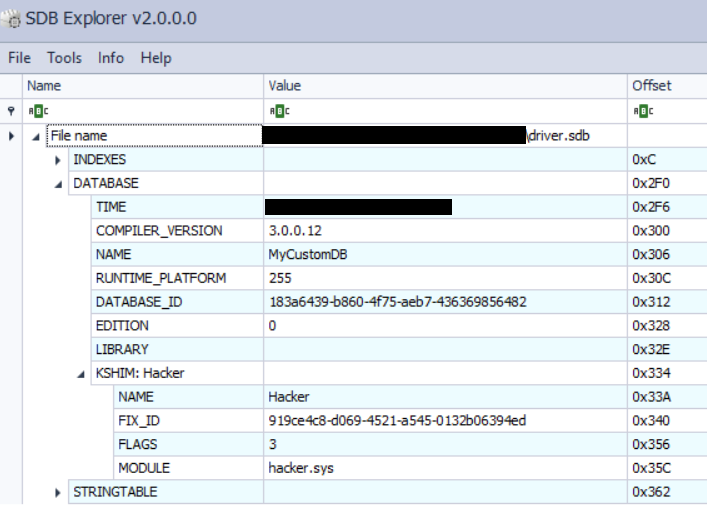
We can now take an XML application fix definition and compile it to and SDB easily. Here is an example from Geoff's writeup that adds a KSHIM entry to our new SDB.
<?xml version="1.0"?>
  <DATABASE NAME="MyCustomDB" ID="{183a6439-b860-4f75-aeb7-436369856482}">
    <LIBRARY>
      <KSHIM NAME="Hacker" FILE="hacker.sys" ID="{919CE4C8-D069-4521-A545-0132B06394ED}" LOGO="YES" ONDEMAND="YES" />
    </LIBRARY>
  </DATABASE>
Inspecting our new SDB with SDB Explorer we can see that it's working perfectly.
Another example of adding a fix for an application with the RedirectEXE SHIM would look something like this
<?xml version="1.0"?>
  <DATABASE NAME="Super Duper Secret APT Database" ID="{a83a6439-b860-4f75-aeb7-436369856482}">
    <APP NAME="bypas_lmao" ID="{7480bc66-8ee9-408c-a486-097d1430cb8e}">
      <EXE NAME="bypass_lmao.exe" ID="{a2d9672a-22b8-4f66-acfd-a13709bef64c}" RUNTIME_PLATFORM="X86;WOW64;AMD64">
        <SHIM NAME="RedirectEXE">
        </SHIM>
      </EXE>
    </APP>
  </DATABASE>
Extra XML Format Info#
I was curious about the content of the generated XML by SUA. As the XML format is not documented anywhere, seeing how Microsoft does it would certainly be helpful. Fortunately for us the SUAnalyzer.exe is written in .NET which means we can inspect it.
Jumping directly to the MakeXML function inside of the ShimDB class we find the template for the XML. Here its after some makeup
<?xml version="1.0"?>
  <DATABASE NAME="AppCompat shims for {0} (Generated by SUA - {1})" ID="{{{2}}}">
    <APP NAME="{0} -- Anonymous Application modified by the Standard User Analyzer" ID="{{{0}}}">
      <EXE NAME="{0}" MATCH_MODE="ADDITIVE"  FILE_DESCRIPTION="{0}" PRODUCT_NAME="{0}" COMPANY_NAME="{0}" BIN_PRODUCT_VERSION="{0}" BIN_FILE_VERSION="{0}" ID="{{{0}}}">
        <FLAG NAME="{0}"/>
        <SHIM NAME="{0}">
          <INCLUDE MODULE="*"/>
        </SHIM>
        <SHIM NAME="{0}" COMMAND_LINE="{1}">
          <INCLUDE MODULE="*"/>
        </SHIM>
      </EXE>
    </APP>
  </DATABASE>
The rest of the binary has other interesting stuff but that's information for another writeup.
Small Caveat#
Unfortunately the fixApp always calls ShimDBC with the same initial commands as those are hardcoded in its Main function as shown by screenshots above.
shimdbc custom -n -q <Input> <Output>But this isn't a problem in most cases as the Custom mode include all entries from Drivers to AppHelp and Fixes.
Appendix#
Its been documented before but it doesn't hurt to link it here too. Below is the full help as extracted from the fixApp binary.
Usage: ShimDBC <mode> <command switches> <input file> [output file]

    <mode>               Determines which entries will be included in the sdb
                         produced. If not specified it will be determined from
                         the makefile which will then be required (see -x).
    <input file>         The input xml file. Not valid if -x is used.
    <output file>        The output sdb file. Not valid if -x is used.

    Modes (filter - makefile can override whatever is specified):
      Custom             Include all entries.
      Fix                Include application fix entries.
      AppHelp            Include AppHelp entries (obsolete in OS sdb files).
      MSI                Include MSI entries.
      Driver             Include driver entries.
      Quirk              Include quirk entries.
      OsUpgradeApps      Include setup related application entries.
      OsUpgradeDevices   Include setup related driver entries.

    Command switches (current):
      -e                 Enforce pretty print format.
      -ga                Generate Ait files for Quirks
      -gq                Generate headers for Quirks
      -l <language>      Specifies the language to compile for.
      -m <dir path>      Specifies the Migration xml support files directory
      -op <platform>     Specifies what platforms to compile for.
                         Valid platforms are:
                             X86         32 bit X86 (native) entries
                             AMD64       64 bit AMD64 (native) entries
                             X86_AMD64   32 bit X86 (on AMD64) entries
                             ARM         32 bit ARM (native) entries
                             ARM64       64 bit ARM64 (native) entries
                             X86_ARM64   32 bit X86 (on ARM64) entries
                             ARM_ARM64   32 bit ARM (on ARM64) entries
                             X86_WOW     Includes X86_AMD64 and X86_ARM
                             ARM_WOW     Includes ARM_ARM64
                             WOW64       Identical to X86_WOW
                             I386        Identical to X86_ANY
                           Specify -op multiple times for multiple platforms
      -q                 Quiet mode.
      -sm                Indicates the output sdb is intended for sdb merge
                         to be merged into a larger sdb. This alters some of
                         of the LIBRARY checks and allows for placeholder
                         space for referenced TAGID values that are filled in
                         at merge time.
      -td <guid>         Specify the target database id for a merge sdb
      -ts                Use the current time for the database build time
                         instead of the place holder time.
      -v[s]              Verbose statistics. -vs indicates summary form.
      -x <file path>     Use the makefile specified.
      -z                 Write output sdb file as a ZDB (compressed sdb).

    Command switches (deprecated/obsolete/unsupported):
      -a <file path>     Specifies the reference XML for the AppHelp database
                         This is usually the fix database (AppHelp mode only)
      -f <file path>     Include FILE binaries in database <file path> is
                         directory to grab binaries from. (Fix mode only)
      -iw <file path>    Creates list of GUIDs to exclude from strict checks.
      -ir <file path>    Excludes the given list of GUIDs to exclude from
                         strict checks.
      -n                 No strict compilation checking.
      -w                 Sort APP, SHIM, PATCH & MSI_TRANSFORM blocks:
                         requires file to be writeable (never use in build).