Introduction#
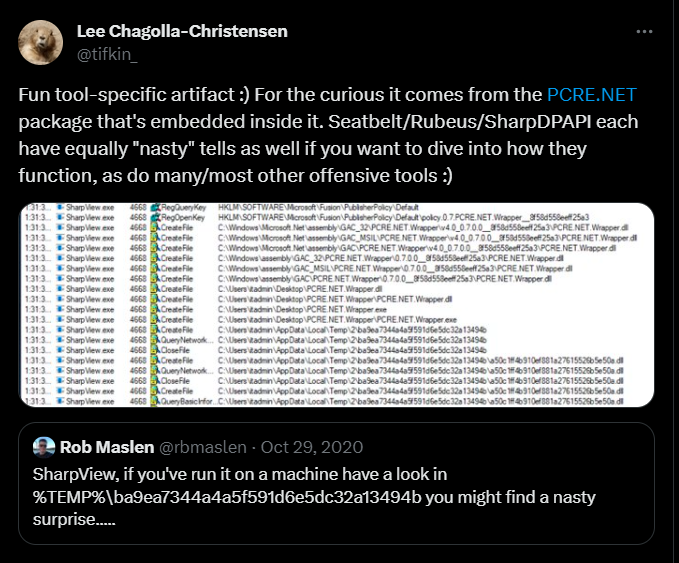
A couple of years ago, @rbmaslen and @tifkin_ posted the above tweet indicating that when you execute SharpView an artefact is created in the %temp% directory and it's related to the PCRE.NET module.
%TEMP%\ba9ea7344a4a5f591d6e5dc32a13494b\6c9254b82dc34bf3bcc88fa65afa41d3.dll

%TEMP%\ba9ea7344a4a5f591d6e5dc32a13494b\a50c1ff4b910ef881a27615526b5e50a.dll
This post is an explanation on why and how this occurs.
SharpView Usage Of PCRE.NET#
SharpView make use of the PCRE.NET package in order to match regular expression. We can see some usage in the following code snippets.
string MemberDN = null;
    try
    {
        MemberDN = Properties["distinguishedname"][0].ToString();
        if (MemberDN.IsRegexMatch(@"ForeignSecurityPrincipals|S-1-5-21"))
        {
            try
            {
                ...
                ...
                ...
            }
            ...
            ...
            ...
        }
    ...
    ...
    ...
    }
The IsRegexMatch and similar are wrapper functions around PCRE defined in RegexMatch.cs.
Compiling SharpView will create the packages folder and inside, we'll find the PCRE.NET.dll compiled DLL. Let's look at it next.
Inspecting PCRE.NET.dll#
Inspecting the binary in DotPeek will reveal that it has 2 resources of instance .NET.

Extracting these resources and comparing them to the artefact files left by SharpView execution will reveal that they are the same. And the DLL assembly is called PCRE.NET.Wrapper
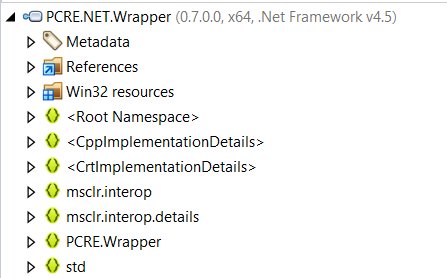
This means that during the execution of SharpView once the PCRE.NET.dll is loaded, it's somehow extracting these resources and dropping them into temp for use.
Looking at these resources, we can see that they have an "uncommon" starting name asmz://. Googling a bit will reveal that this is generated by a tool called LibZ. From the project description we read.
LibZ is an alternative to ILMerge. It allows you to distribute your applications or libraries as a single file with assemblies embedded into it or combined together into a container file.This aligns with what we found so far. Keep this in mind as we're gonna go back to it in a bit.
We know from SharpView that the version of PCRE.NET that's used is 0.7. As its open source, let's inspect the source code a bit.
We quickly find the PCRE.NET.Wrapper source and a build.cake that uses the libz.exe binary in order to build the PCRE.NET.dll
Task("Merge")
    .IsDependentOn("Clean")
    .IsDependentOn("Build")
    .Does(() => {
        CopyFile(rootDir + $@"\src\PCRE.NET\bin\{configuration}\PCRE.NET.dll", outDll);
        CopyFile(rootDir + $@"\src\PCRE.NET.Wrapper\bin\Win32\{configuration}\PCRE.NET.Wrapper.dll", outputDir + @"\PCRE.NET.Wrapper.x86.dll");
        CopyFile(rootDir + $@"\src\PCRE.NET.Wrapper\bin\x64\{configuration}\PCRE.NET.Wrapper.dll", outputDir + @"\PCRE.NET.Wrapper.x64.dll");
        CopyFile(outputDir + @"\PCRE.NET.Wrapper.x64.dll", outputDir + @"\PCRE.NET.Wrapper.dll");

        StartProcess(
            rootDir + @"\src\packages\LibZ.Bootstrap.1.1.0.2\tools\libz.exe",
            new ProcessSettings()
                .UseWorkingDirectory(outputDir)
                .WithArguments(args => args
                    .Append("inject-dll")
                    .AppendSwitchQuoted("--assembly", outDll)
                    .AppendSwitchQuoted("--include", outputDir + @"\PCRE.NET.Wrapper.x86.dll")
                    .AppendSwitchQuoted("--include", outputDir + @"\PCRE.NET.Wrapper.x64.dll")
                    .AppendSwitchQuoted("--key", rootDir + @"\src\PCRE.NET.snk")
                    .Append("--move")
            )
        );

        DeleteFile(outputDir + @"\PCRE.NET.Wrapper.dll");
    });
This section is basically calling the following command
libz.exe inject-dll -assembly PCRE.NET.dll --include PCRE.NET.Wrapper.x86.dll --include PCRE.NET.Wrapper.x64.dll --key PCRE.NET.snkFrom the help of the libz library we read that the inject-dll argument "Injects .dll file into assembly as resource".
This explains how the resources are embedded into the DLL. We now need to understand why the name is "fixed" for every execution and how its generated. Also who is responsible for the extraction.
Inspecting Inject-DLL Source#
/// <summary>Injects the DLL.</summary>
/// <param name="targetAssembly">The target assembly.</param>
/// <param name="sourceAssembly">The source assembly.</param>
/// <param name="sourceAssemblyBytes">The source assembly bytes.</param>
/// <param name="overwrite">
///     if set to <c>true</c> overwrites existing resource.
/// </param>
/// <returns>
///     <c>true</c> if assembly has been injected.
/// </returns>
protected static bool InjectDll(
    AssemblyDefinition targetAssembly,
    AssemblyDefinition sourceAssembly, byte[] sourceAssemblyBytes,
    bool overwrite)
{
    var flags = String.Empty;
    if (!MsilUtilities.IsManaged(sourceAssembly))
        flags += "u";
    if (MsilUtilities.IsPortable(sourceAssembly))
        flags += "p";

    var input = sourceAssemblyBytes;
    var output = DefaultCodecs.DeflateEncoder(input);

    if (output.Length < input.Length)
    {
        flags += "z";
    }
    else
    {
        output = input;
    }

    var architecture = MsilUtilities.GetArchitecture(sourceAssembly);
    var architecturePrefix =
        architecture == AssemblyArchitecture.X64 ? "x64:" :
            architecture == AssemblyArchitecture.X86 ? "x86:" :
                string.Empty;
    var guid = Hash(architecturePrefix + sourceAssembly.FullName);

    var resourceName = String.Format(
        "asmz://{0:N}/{1}/{2}",
        guid, input.Length, flags);

    var existing = targetAssembly.MainModule.Resources
        .Where(r => Hash(r) == guid)
        .ToArray();

    if (existing.Length > 0)
    {
        if (overwrite)
        {
            Log.Warn("Resource '{0}' already exists and is going to be replaced.", resourceName);
            foreach (var r in existing)
                targetAssembly.MainModule.Resources.Remove(r);
        }
        else
        {
            Log.Warn("Resource '{0}' already exists and will be skipped.", resourceName);
            return false;
        }
    }

    var resource = new EmbeddedResource(
        resourceName,
        ManifestResourceAttributes.Public,
        output);

    targetAssembly.MainModule.Resources.Add(resource);

    return true;
}
To understand how the resource is being embedded and how its being named we start from the end and make our way up.
 var resource = new EmbeddedResource(
        resourceName,
        ManifestResourceAttributes.Public,
        output);
This function takes the resourceName as a first parameter, let's inspect it next.
var resourceName = String.Format(
        "asmz://{0:N}/{1}/{2}",
        guid, input.Length, flags);
This looks promising as we can see the "uncommon" start along with a string being formatted with 3 variables. Let's inspect how their content is filled.
input.lengthis the length of the assembly bytesvar input = sourceAssemblyBytes;flagsis based on a couple of test on the binary. (see function above)guidis a bit more complex and is the one we're interested in so let's take a detailed look.
The Hash function is defined as follows
protected static Guid Hash(string text)
{
    return new Guid(
        MD5Service.ComputeHash(
            Encoding.UTF8.GetBytes(text.ToLowerInvariant())));
}
...
...
...
var guid = Hash(architecturePrefix + sourceAssembly.FullName);
The text in our case is the concatenation of 2 values. The first is architecturePrefix which is calculated from the assembly architecture as a result of the GetArchitecture function.
var architecture = MsilUtilities.GetArchitecture(sourceAssembly);
var architecturePrefix =
    architecture == AssemblyArchitecture.X64 ? "x64:" :
    architecture == AssemblyArchitecture.X86 ? "x86:" :
    string.Empty;
The second part of the string is the sourceAssembly full name. In our case the assembly name of PCRE.NET.Wrapper is the following
"PCRE.NET.Wrapper, Version=0.7.0.0, Culture=neutral, PublicKeyToken=8f58d558eeff25a3"Computing everything will get us 2 values.
asmz://6c9254b82dc34bf3bcc88fa65afa41d3/458240/uz # x64
asmz://a50c1ff4b910ef881a27615526b5e50a/401408/uz # x86
Which answers the questions of how those temp files got their name. Which means if the Assembly name changes we would get different hashes.
Extracting Resources Via AsmResolver#
While bundling the DLL inside the assembly the libz library also inject another code known as AsmZResolver. This is responsible for getting assemblies straight from resources.
For our case we're particularly interested in the function LoadUnmanagedAssembly from AsmZResolver.cs
private static Assembly LoadUnmanagedAssembly(
    string resourceName,
    Guid guid,
    byte[] assemblyImage)
{
    AsmZResolver.Debug(string.Format("Trying to load as unmanaged/portable assembly '{0}'", (object) resourceName));
    string str1 = Path.Combine(Path.GetTempPath(), AsmZResolver.ThisAssemblyGuid.ToString("N"));
    Directory.CreateDirectory(str1);
    string str2 = Path.Combine(str1, string.Format("{0:N}.dll", (object) guid));
    FileInfo fileInfo = new FileInfo(str2);
    if (!fileInfo.Exists || fileInfo.Length != (long) assemblyImage.Length)
    File.WriteAllBytes(str2, assemblyImage);
    return Assembly.LoadFrom(str2);
}
Without boring you with the details of the whole function, let's only look at following.
string str1 = Path.Combine(Path.GetTempPath(), AsmZResolver.ThisAssemblyGuid.ToString("N"));
Directory.CreateDirectory(str1);
This is the portion responsible for creating the temporary directory that was mentioned in the original tweet. And the value is the MD5 hash of the assembly name of the PCRE.NET DLL.
"PCRE.NET, Version=0.7.0.0, Culture=neutral, PublicKeyToken=8f58d558eeff25a3"Which will give us
ba9ea7344a4a5f591d6e5dc32a13494bAppendix#
-
Something to note is that recent from version 0.8.0, PCRE.NET no longer uses this embedded technique.
-
This is still a behavior of recent versions of the libz library. So any project that depends on packages that leverage it, will show similar effect.
-
To test the hash calculation quickly you can use the following (from PCRE test code)
foreach (var prefix in new[] { "", "x86:", "x64:" })
{
    var str = prefix + "ASSEMBLY_NAME"; // PCRE.NET.Wrapper, Version=0.7.0.0, Culture=neutral, PublicKeyToken=8f58d558eeff25a3
    var hash = new Guid(MD5.Create().ComputeHash(Encoding.UTF8.GetBytes(str.ToLowerInvariant())));

    Console.WriteLine("{0:N} = {1}", hash, str);
}